顯示具有 ssh 標籤的文章。 顯示所有文章

2025/10/28

這几天因為要測個東西
所以需要使用到raspberry pi
把raspberry pi 設定成AP
想到不久前才出新的pi os
所以直接下載重刷
開几後發現這個版本預設就有 hotspot功能
直接設定就可以用了
之前還要裝很多東西
方便多了
但使用上發現一個問題
就是當client 走無線ssh進raspberry後
只要下指定就會hang住
找了半天資料
發現是qos的問題
又試了很多參數

IPQoS cs0 cs0
IPQoS 0x00
以上都沒用

以下這個才有用
IPQoS throughput

修改 /etc/ssh/sshd_config

在最後加上
IPQoS throughput


systemctl restart ssh

才解決

今天又試了一下 問題還是存在

決定採用

2025/01/14

又到了弱掃的時間
昨天看報告
有二個問題

Vulnerability Detection Result
The remote SSH server supports the following weak KEX algorithm(s):
KEX algorithm | Reason
------------------------------------------------
diffie-hellman-group-exchange-sha1 | Using SHA-1


Vulnerability Detection Result
The remote SSH server supports the following weak client-to-server encryption algorithm(s):
aes128-cbc
aes256-cbc
The remote SSH server supports the following weak server-to-client encryption algorithm(s):
aes128-cbc
aes256-cbc


想說改一下 /etc/ssh/sshd_config就可以了

Ciphers aes128-ctr,aes192-ctr,aes256-ctr

KexAlgorithms curve25519-sha256,curve25519-sha256@libssh.org,ecdh-sha2-nistp256,ecdh-sha2-nistp384,ecdh-sha2-nistp521,diffie-hellman-group14-sha256,diffie-hellman-group16-sha512,diffie-hellman-group18-sha512

沒想到重掃還是一樣

因為每次掃都要花很多時間
所以使用 nmap 特別針對ssh server來掃

nmap --script ssh2-enum-algos -sV -p 22   10.0.0.1


Starting Nmap 7.80 ( https://nmap.org ) at 2025-01-21 13:47 CST
Nmap scan report for 10.0.0.1
Host is up (0.00079s latency).

PORT   STATE SERVICE VERSION
22/tcp open  ssh     OpenSSH 8.0 (protocol 2.0)
| ssh2-enum-algos: 
|   kex_algorithms: (12)
|       curve25519-sha256
|       curve25519-sha256@libssh.org
|       ecdh-sha2-nistp256
|       ecdh-sha2-nistp384
|       ecdh-sha2-nistp521
|       diffie-hellman-group-exchange-sha256
|       diffie-hellman-group14-sha256
|       diffie-hellman-group16-sha512
|       diffie-hellman-group18-sha512
|       diffie-hellman-group-exchange-sha1
|       diffie-hellman-group14-sha1
|       kex-strict-s-v00@openssh.com
|   server_host_key_algorithms: (5)
|       rsa-sha2-512
|       rsa-sha2-256
|       ssh-rsa
|       ecdsa-sha2-nistp256
|       ssh-ed25519
|   encryption_algorithms: (7)
|       aes256-gcm@openssh.com
|       chacha20-poly1305@openssh.com
|       aes256-ctr
|       aes256-cbc
|       aes128-gcm@openssh.com
|       aes128-ctr
|       aes128-cbc
|   mac_algorithms: (8)
|       hmac-sha2-256-etm@openssh.com
|       hmac-sha1-etm@openssh.com
|       umac-128-etm@openssh.com
|       hmac-sha2-512-etm@openssh.com
|       hmac-sha2-256
|       hmac-sha1
|       umac-128@openssh.com
|       hmac-sha2-512
|   compression_algorithms: (2)
|       none
|_      zlib@openssh.com

Service detection performed. Please report any incorrect results at https://nmap.org/submit/ .
Nmap done: 1 IP address (1 host up) scanned in 0.29 seconds

果然還是沒用
找了半天資料 才找到解決方法

先處理 
aes128-cbc
aes256-cbc

先建一個文件內容如下

vi /etc/crypto-policies/policies/modules/DISABLE-CBC.pmod

cipher = -AES-128-CBC -AES-256-CBC
ssh_cipher = -AES-128-CBC -AES-256-CBC


更新加密策略

update-crypto-policies --set DEFAULT:DISABLE-CBC


再來處理

diffie-hellman-group-exchange-sha1


vi /etc/crypto-policies/back-ends/opensshserver.config

刪除以下文字

,diffie-hellman-group-exchange-sha1,diffie-hellman-group14-sha1


重啟 sshd

systemctl restart sshd


再跑一次 
nmap --script ssh2-enum-algos -sV -p 22   10.0.0.1

Starting Nmap 7.80 ( https://nmap.org ) at 2025-01-21 13:59 CST
Nmap scan report for 10.0.0.1
Host is up (0.00077s latency).

PORT   STATE SERVICE VERSION
22/tcp open  ssh     OpenSSH 8.0 (protocol 2.0)
| ssh2-enum-algos: 
|   kex_algorithms: (10)
|       curve25519-sha256
|       curve25519-sha256@libssh.org
|       ecdh-sha2-nistp256
|       ecdh-sha2-nistp384
|       ecdh-sha2-nistp521
|       diffie-hellman-group-exchange-sha256
|       diffie-hellman-group14-sha256
|       diffie-hellman-group16-sha512
|       diffie-hellman-group18-sha512
|       kex-strict-s-v00@openssh.com
|   server_host_key_algorithms: (5)
|       rsa-sha2-512
|       rsa-sha2-256
|       ssh-rsa
|       ecdsa-sha2-nistp256
|       ssh-ed25519
|   encryption_algorithms: (5)
|       aes256-gcm@openssh.com
|       chacha20-poly1305@openssh.com
|       aes256-ctr
|       aes128-gcm@openssh.com
|       aes128-ctr
|   mac_algorithms: (8)
|       hmac-sha2-256-etm@openssh.com
|       hmac-sha1-etm@openssh.com
|       umac-128-etm@openssh.com
|       hmac-sha2-512-etm@openssh.com
|       hmac-sha2-256
|       hmac-sha1
|       umac-128@openssh.com
|       hmac-sha2-512
|   compression_algorithms: (2)
|       none
|_      zlib@openssh.com

Service detection performed. Please report any incorrect results at https://nmap.org/submit/ .
Nmap done: 1 IP address (1 host up) scanned in 0.33 seconds


已經全部修正
再重掃一次也沒問題了

2024/06/12

本次弱掃有關SSH出現以下二個中風險


The remote SSH server is configured to allow / support weak key

exchange (KEX) algorithm(s).

Detection Result

The remote SSH server supports the following weak KEX algorithm(s):


KEX algorithm                      | Reason

------------------------------------------------

diffie-hellman-group-exchange-sha1 | Using SHA-1


The remote SSH server is configured to allow / support weak
encryption algorithm(s).
Detection Result
The remote SSH server supports the following weak client-to-server encryption algorithm(s):

aes128-cbc
aes256-cbc

解決方式是在 /etc/ssh/sshd_config
加入以下二行

Ciphers aes128-ctr,aes192-ctr,aes256-ctr

KexAlgorithms curve25519-sha256,curve25519-sha256@libssh.org,ecdh-sha2-nistp256,ecdh-sha2-nistp384,ecdh-sha2-nistp521,diffie-hellman-group-exchange-sha256,diffie-hellman-group14-sha256,diffie-hellman-group16-sha512,diffie-hellman-group18-sha512,diffie-hellman-group14-sha1

重新啟動daemon


2024/02/03

今天要ssh 到server時出現錯誤

ssh root@10.1.1.1
Bad packet length 1657225410.
ssh_dispatch_run_fatal: Connection to 10.1.1.1 port 22: Connection corrupted


log出現以下錯誤

Feb  3 08:10:34 mail sshd[2963]: Bad packet length 1492758558. [preauth]
Feb  3 08:10:34 mail sshd[2963]: ssh_dispatch_run_fatal: Connection from 10.1.1.2 port 38462: Connection corrupted [preauth]

最新沒改設定 是不是有更新 查了一下

2024-02-03T02:05:13+0800 DEBUG Upgraded: openssh-server-8.0p1-19.el8_9.2.x86_64

果然沒錯
但要怎麼解決呢
這台是少數在用的几台 oracle linux 8
google 了一下果然有人也碰到問題

有人提出解法

ssh -c aes256-gcm@openssh.com user@host.example.com

試了一下沒問題

或是將 aes256-gcm@openssh.com 加到 /etc/ssh/ssh_config裡的 Ciphers 的這行
如下

Ciphers aes256-gcm@openssh.com,aes128-ctr,aes192-ctr,aes256-ctr,aes128-cbc,3des-cbc


2023/04/21

mobasshtunnel  local port forwarding 使用時机如下
有一台僅供內部使用的 proxy 或 server
想要透過 tunnel 使用
架構圖如下


2023/02/07

sshpass

範例

sshpass -p passwd ssh root@10.0.0.1 date


2022/12/21

這几天試了一下 mosh
主要是在網路環境不佳時
使用ssh可以減少lag的情況
尤其是在4G或wifi時
在不特定 client ip 的情況下建議使用 ssh key認証
只要在server 端安裝 mosh 就可以
apt install mosh

client 端連線要選擇支援mosh的軟体

mobaxterm

JuiceSSH

這二個都有支援

client端發起連線就會自動呼叫 server端的 mosh
所以server端不用起daemon或事先執行

2022/07/04

將 guest 移至esxi後 因為需要定時重開几還原

記錄一下設定

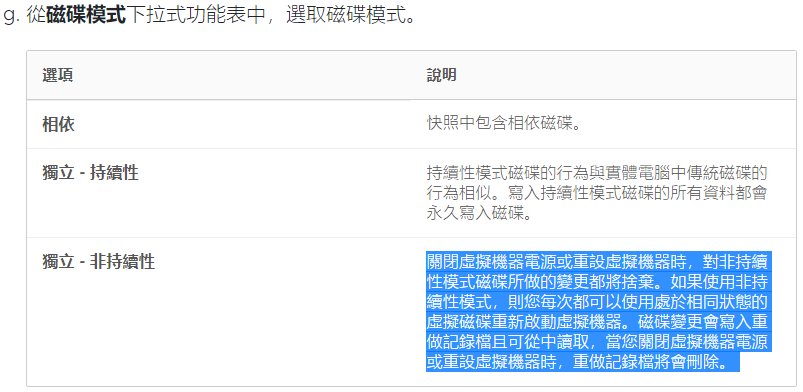
首先將 hd 模式設為 獨立-非持續性


說明如下


esxi啟動 SSH     以SSH登入


接下來取得vmid

vim-cmd vmsvc/getallvms


如果要從esxi關机 指令如下(guest要安裝 vmware tools 指令 apt install open-vm-tools )

vim-cmd vmsvc/power.shutdown [VMID]


開几指令如下

vim-cmd vmsvc/power.on [VMID]

無法直接使用contab -e
必需手動編輯下列檔案

/var/spool/cron/crontabs/root


https://anby.org/index.php/archives/182/


https://www.osslab.com.tw/vmware_disk_mode_recovery/

2022/05/21

之前一直都是在synology上使用docker
但因為某個原因
必須在有adsl線路上的几器上能讓外部連入
所以想到在該几器上安裝docker
記錄一下 目前有使用到的指令

安裝
sudo apt install docker.io

檢查狀態
systemctl status docker

設定開几啟動
sudo systemctl enable docker

把要使用docker的user加入docker群組
sudo usermod -aG docker username

登出再登入

檢查docker
docker version

搜尋docker 映像檔 ubuntu
docker search ubuntu

下載映像檔
docker pull ubuntu

列出目前已下載的映像檔
docker images

啟動 container 
docker run -itd container_id /bin/bash

列出目前已啟動的container
docker ps

登入已啟動的container
docker exec -it  container_id /bin/bash

安裝 ssh server
apt install open-sshserver

參考此篇設定使用public key 登入並改變啟動port
假設改為 port 2222

全部改好後存檔成另一個images 
docker commit container_id
會存成另一個images

關閉container
docker stop container_id

重新啟動並對應port 而且啟動ssh server 並設定重開後啟動container
docker run container_id -p 2222:2222 --restart=always /usr/sbin/sshd -D 

docker images
REPOSITORY   TAG       IMAGE ID       CREATED        SIZE
<none>       <none>    57d619e840f1   16 hours ago   274MB
ubuntu       latest    d2e4e1f51132   3 weeks ago    77.8MB

刪除不使用的images
docker rmi image_id


查看目前所有容器的狀態 包含正在執行及已stop 
docker ps -a

停止容器的命令如下
$ docker stop container_id

啟動停止的容器 容器內之前的異動資料不會消失
$ docker start container_id


删除容器
$ docker rm container_id


2021/09/19

今天想把原本放在lxc nginx 上的iso 檔放到synology docker
先下載容器


下載後進行佈署


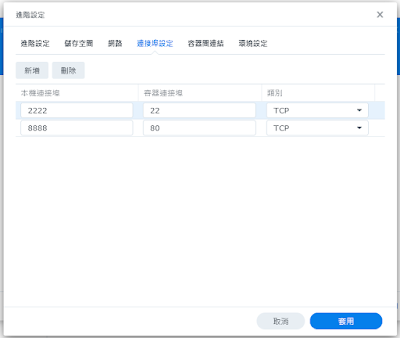
設定80及22的對應連接埠


範本預設沒有安裝ssh 
所以要手動安裝


到容器 詳細資料 開啟 終端機

apt update
apt install openssh-server


安裝好執行

service ssh start

docker內無法使用 sytemctl


目前碰到的問題是無法開几自動執行 ssh server
必須每次進終端機 手動啟動


2018/11/13

fortiOS 5.2的REST有問題 不要用


最近有個朋友問我有沒有用過fortiget rest的功能 5.2之後提供
其實之前就有再找
只是後來程式都直接用 ssh或telnet去下指令
既然有人問了
就再來找找

一閞始找到的這二個資料
可以查 可以刪 但不能新增 也不能update
所以不要再浪費時間了


直到後來找到這個 完全沒問題啊 而且也不用自己去寫jason格式 而且反應速度相當快

https://github.com/DavidChayla/FortigateApi/blob/master/README.md

記錄一下用法

首先要下載回來後要先 import

import sys
sys.path.append('PATH TO FortigateApi.py')

再來依照文件說明

import FortigateApi

fg = FortigateApi.Fortigate('10.20.30.40', 'root', 'admin', 'mypasswd')

fg.AddFwAddress('srv-A','10.1.1.1/32')

200

fg.GetFwAddress('srv-A')

u'{\n "http_method":"GET",\n "results":[\n {\n "name":"srv-A",\n "q_origin_key":"srv-A",\n "uuid":"2103d064-d520-51e6-de84-16e9ab03b8ae",\n "subnet":"10.1.1.1 255.255.255.255",\n "type":"ipmask",\n "start-ip":"10.1.1.1",\n "end-ip":"255.255.255.255",\n "fqdn":"",\n "country":"",\n "url":"",\n "cache-ttl":0,\n "wildcard":"10.1.1.1 255.255.255.255",\n "comment":"",\n "visibility":"enable",\n "associated-interface":"",\n "color":0,\n "tags":[\n ]\n }\n ],\n "vdom":"dc2",\n "path":"firewall",\n "name":"address",\n "mkey":"srv-A",\n "status":"success",\n "http_status":200,\n "serial":"FWF90D3Z13003141",\n "version":"v5.2.9",\n "build":736\n}'

fg.SetFwAddress('srv-A','10.2.2.2/32')

200

fg.DelFwAddress('srv-A')

200


2017/12/15

解決下完ssh連線指令要等很久才會跳出密碼輸入畫面的解決方法

在被連線的server上

vi /etc/ssh/sshd_config

1. 將 GSSAPIAuthentication yes
改成
GSSAPIAuthentication no

2. 將 #UseDNS yes
改成
UseDNS no

3. 重新啟動 sshd 服務

http://blog.xuite.net/tolarku/blog/292705102-Linux+SSH+%E7%99%BB%E5%85%A5%E9%80%9F%E5%BA%A6%E6%85%A2+-+CentOS

2017/10/08

記錄一下如何在 X11 forword的情況下把聲音一起forword

二台都是linux

近端的機器必須先安裝 pulseaudio paprefs 這二個package
一般而言目前使用的音效都已經裝好且應該都是 pulseaudio   使用的port 是4713
而 paprefs 是設定程式 裝好後執行 paprefs
依照下方的圖進行勾選設定


設定好後就可以使用ssh 連上遠端机器

ssh -C -c arcfour -X -R 4715:localhost:4713 user@remote.ip

4715:localhost:4713  主要是要把遠端4175的封包傳到近端來

登入遠端後要先執行

export PULSE_SERVER=localhost:4715

把聲音導到 port 4715
(確認port 4715 是不是沒在使用)


再來執行程式

firefox

此時打開youtune 看影片就可以聽到聲音了


http://guildwar23.blogspot.tw/2012/11/

因為一直有把遠端的桌面利用X11 Forwarding的需求
而且是利用internet傳輸
但一直碰到的問題就是感覺非常慢
今天查了一下資料
應該可以改變一下加密的方法來加速
首先先在server上加上加密方法的支援

$ echo "Ciphers aes128-ctr,aes192-ctr,aes256-ctr,aes128-gcm@openssh.com,aes256-gcm@openssh.com,chacha20-poly1305@openssh.com,blowfish-cbc,aes128-cbc,3des-cbc,cast128-cbc,arcfour,aes192-cbc,aes256-cbc" | sudo tee --append /etc/ssh/sshd_config

再來連線時就可以使用不同的加密演算法

ssh -c arcfour,blowfish-cbc -XC host.com

以下列出使用不同演算法的速度
自己參考看看囉


https://godleon.github.io/blog/2016/06/02/HowTo-SpeedUp-X11-Forwarding-in-SSH
http://xmodulo.com/how-to-speed-up-x11-forwarding-in-ssh.html
https://blog.famzah.net/2010/06/11/openssh-ciphers-performance-benchmark/
http://debiannoteofj.blogspot.tw/2010/09/x11-forwarding.html
http://www.miscdebris.net/blog/2007/06/01/speed-up-ssh-x11-forwarding/

2016/02/16

最近把server慢慢升到centos 7
一些轉換用到的東西記一下

原本使用ftp server 來傳資料 改用ssh
lftp sftp://user:password@host  -e "put local-file.name; bye"

裝好log server後使用 nc來進行測試
echo ‘<14>sourcehost message text’ | nc -v -u -w 0 server_ip 514

2015/07/22

雖然網路上已經有很多關於使用ssh不用打密碼的教學文章
還是稍微記一下好了

先在client和server使用者的home目錄下建立.ssh的目錄

在client的机器中執行以下指令

ssh-keygen -t rsa 或 ssh-keygen -t dsa

dsa rsa 是二種不同的加密方式 就看要選擇那一種

之後按個几次enter

會在.ssh這個目錄內產生一對檔案
id_dsa  
id_dsa.pub  
id_rsa  
id_rsa.pub

接下來把.pub那個檔案傳到要連線的server上
scp id_rsa.pub server_ip:~/.ssh/

再連到server上執行
cat .ssh/id_rsa.pub >> .ssh/authorized_keys

exit後再次連到server就無需再打密碼了

若有很多的client端key要放到server上
只要把pub檔附加到authorized_keys即可
cat .ssh/id_rsa.pub >> .ssh/authorized_keys

server端 修改  /etc/ssh/sshd_config

PasswordAuthentication no
PubkeyAuthentication yes


如果要開放 root login

PermitRootLogin prohibit-password

改為:

PermitRootLogin yes


某些os可能不接受dsa的key而無法登入 此時就要換用rsa


2014/11/09

今天有朋友問到要如何限制user登入後只能在home directory活動
找到一個方式很簡單
只要在/etc/passwd把user 的shell改成rbash就好了
超方便

http://www.cyberciti.biz/faq/restrict-linux-users-to-their-home-directories-only/

2014/03/03

之前一直都是使用xming來當做 m$ windows上的x server
發現了一個更好用的東東
內建ssh client及x server還有一堆功能
太強大了

2013/08/26

最近一直在try ubuntu上的kvm相關功能
在ubuntu上裝了virt-viewer卻一直連不上遠端的kvm
一直出現URI錯誤
試了半天發現到ssh 的另一個功能
ssh -Y abc@1.1.1.1 登入後
接下來執行的指令就都會forword到本地端來了
所以直接使用virt-manager就可以囉

2013/06/24

因為有可能要做主机的升級
有資料必需要移到新机器上
之前使用clonezilla時有提供利用ssh mout遠端目錄的功能
使用的是sshfs
在centos 5.6 以上只要yum install sshfs -y
接下來

usage: sshfs [user@]host:[dir] mountpoint [options]

http://talk.away.com.tw/main/modules/weblog/details.php?blog_id=167