2024/05/09

這几天進graylog時提示6版已經出來了
看官網說的是可以直接更新
還是先裝一台來試看看好了
這次用的是almalinux 9
6版已經不再支援 elasticsearch 了
依照官網安裝流程裝到opensearch就有問題了
安裝後無法啟動
看了一下 opensearch.yml

裡面有一段 

######## Start OpenSearch Security Demo Configuration ########
# WARNING: revise all the lines below before you go into production
plugins.security.ssl.transport.pemcert_filepath: esnode.pem
plugins.security.ssl.transport.pemkey_filepath: esnode-key.pem
plugins.security.ssl.transport.pemtrustedcas_filepath: root-ca.pem
plugins.security.ssl.transport.enforce_hostname_verification: false
plugins.security.ssl.http.enabled: true
plugins.security.ssl.http.pemcert_filepath: esnode.pem
plugins.security.ssl.http.pemkey_filepath: esnode-key.pem
plugins.security.ssl.http.pemtrustedcas_filepath: root-ca.pem
plugins.security.allow_unsafe_democertificates: true
plugins.security.allow_default_init_securityindex: true
plugins.security.authcz.admin_dn: ['CN=kirk,OU=client,O=client,L=test,C=de']
plugins.security.audit.type: internal_opensearch
plugins.security.enable_snapshot_restore_privilege: true
plugins.security.check_snapshot_restore_write_privileges: true
plugins.security.restapi.roles_enabled: [all_access, security_rest_api_access]
plugins.security.system_indices.enabled: true
plugins.security.system_indices.indices: [.plugins-ml-agent, .plugins-ml-config, .plugins-ml-connector,
  .plugins-ml-controller, .plugins-ml-model-group, .plugins-ml-model, .plugins-ml-task,
  .plugins-ml-conversation-meta, .plugins-ml-conversation-interactions, .plugins-ml-memory-meta,
  .plugins-ml-memory-message, .plugins-ml-stop-words, .opendistro-alerting-config,
  .opendistro-alerting-alert*, .opendistro-anomaly-results*, .opendistro-anomaly-detector*,
  .opendistro-anomaly-checkpoints, .opendistro-anomaly-detection-state, .opendistro-reports-*,
  .opensearch-notifications-*, .opensearch-notebooks, .opensearch-observability, .ql-datasources,
  .opendistro-asynchronous-search-response*, .replication-metadata-store, .opensearch-knn-models,
  .geospatial-ip2geo-data*, .plugins-flow-framework-config, .plugins-flow-framework-templates,
  .plugins-flow-framework-state]
node.max_local_storage_nodes: 3
######## End OpenSearch Security Demo Configuration ########

感覺是這段的問題

備分後重新開一個新的 opensearch.yml
裡面的內容只要以下這些就好

cluster.name: graylog
node.name: ${HOSTNAME}
path.data: /var/lib/opensearch
path.logs: /var/log/opensearch
discovery.type: single-node
network.host: 0.0.0.0
action.auto_create_index: false
plugins.security.disabled: true
indices.query.bool.max_clause_count: 32768

改完後啟動就沒問題了

跟之前不同 graylog這個版本安裝好後
打開 http://127.0.0.1:9000 無法進到web介面 
看了一下 /var/log/graylog-server/server.log

It seems you are starting Graylog for the first time. To set up a fresh install, a setup interface has
been started. You must log in to it to perform the initial configuration and continue.

Initial configuration is accessible at 0.0.0.0:9000, with username 'admin' and password 'iIcCiFzjWY'.
Try clicking on http://admin:iIcCiFzjWY@0.0.0.0:9000

需要先 Initial configuration 才能使用
進入後依照畫面的步驟設定後 就能進入graylog的介面了

Memory/Heap usage 預設是1G 要再調整

/etc/sysconfig/graylog-server

GRAYLOG_SERVER_JAVA_OPTS="-Xms1g -Xmx1g -server -XX:+UseG1GC -XX:-OmitStackTraceInFastThrow"

依ram大小調整


2024/05/08

使用 curl 取得ip的相關資訊

curl ipinfo.io/8.8.8.8
{
  "ip": "8.8.8.8",
  "hostname": "dns.google",
  "anycast": true,
  "city": "Mountain View",
  "region": "California",
  "country": "US",
  "loc": "37.4056,-122.0775",
  "org": "AS15169 Google LLC",
  "postal": "94043",
  "timezone": "America/Los_Angeles",
  "readme": "https://ipinfo.io/missingauth"
}

2024/05/06

發生好几次電腦大量封包的傳輸
netflow的值都在几萬甚至几十萬
以往的做法都是先把ip block掉
等user自己來反應
但醬沒辦法在事發的當時撈到相關資料
到底是那個程式造成的
最近找到
LiveTcpUdpWatch
這個工具
就可以在 eset protect 上直接派送到電腦上執行並傳回資料
馬上就可以知道是那支程式造成的 資料撈回來後再把ip block掉
相當方便

程式如下


curl -o %temp%\LiveTcpUdpWatch.exe http://10.0.0.1/LiveTcpUdpWatch.exe

%temp%\LiveTcpUdpWatch.exe /CaptureTime 300000 /scomma "%temp%\tcpudp.csv"

ping -n 310 localhost > NUL

curl -u id:passwd -T "%TEMP%\tcpudp.csv" ftp://10.0.0.2/


https://www.nirsoft.net 這個站裡的工具都很好用

2024/04/29

一直有user反應收信時間會delay的問題
因為之前把greylist打開
目前的想法是分成上下班時段
上班關掉 下班再打開
試一段時間看看

指令如下

/usr/bin/pmgsh set /config/mail -greylist 0

/usr/bin/pmgsh set /config/mail -greylist 1


2024/03/28

為了要測試siem
需要起 snmptrap

找了二個方法
第一個方法是直接用 zabbix_trap_receiver.pl
但有問題起不來


第二個方法是直接改 /etc/snmp/snmptrapd.conf

內容如下

# Example configuration file for snmptrapd
#
# No traps are handled by default, you must edit this file!
#

disableAuthorization yes
authCommunity   log,execute,net public

[snmp] logOption s 2
[snmp] logOption f /tmp/snmptrapd-direct.log

format2 %V\n% Agent Address: %A \n Agent Hostname: %B \n Date: %H - %J - %K - %L - %M - %Y \n Enterprise OID: %N \n Trap Type: %W \n Trap Sub-Type: %q \n Community/Infosec Context: %P \n Uptime: %T \n Description: %W \n PDU Attribute/Value Pair Array:\n%v \n -------------- \n


systemctl restart snmptrapd

醬就可以了

2024/03/15

今天要在一台新安裝的win11 上要更新winget時出現以下訊息

C:\Windows\System32>powershell add-appxpackage %temp%\Microsoft.DesktopAppInstaller_8wekyb3d8bbwe.msixbundle            add-appxpackage : 部署失敗,HRESULT 為: 0x80073CF3, 套件無法進行更新、相依性或衝突驗證。                                Windows 無法安裝套件Microsoft.DesktopAppInstaller_1.22.10661.0_x64__8wekyb3d8bbwe,因為此套件相依于找不到的架構。提供由 "CN=Microsoft Corporation, O=Microsoft Corporation, L=Redmond, S=Washington, C=US"發行的架構"Microsoft.UI.Xaml.2.8"、中 性或x64處理器架構與最低版本8.2310.30001.0,以及要安裝的此套件。
注意: 如需其他資訊,請在事件記錄檔中尋找 [ActivityId] 1c4c5989-76a7-0000-05e8-511ca776da01,或使用命令列 Get-AppPackage
Log -ActivityID 1c4c5989-76a7-0000-05e8-511ca776da01
位於 線路:1 字元:1
+ add-appxpackage C:\Users\aaa\AppData\Local\Temp\Microsoft.DesktopApp ...
+ ~~~~~~~~~~~~~~~~~~~~~~~~~~~~~~~~~~~~~~~~~~~~~~~~~~~~~~~~~~~~~~~~~~~~~
    + CategoryInfo          : WriteError: (C:\Users\aaa\A...bbwe.msixbundle:String) [Add-AppxPackage], IOException
    + FullyQualifiedErrorId : DeploymentError,Microsoft.Windows.Appx.PackageManager.Commands.AddAppxPackageCommand

原因是因為沒有安裝 Microsoft.UI.Xaml.2.8
到github上去找最新版
目前是 2.8.6
下載安裝完再更新winget就沒問題了


2024/03/14

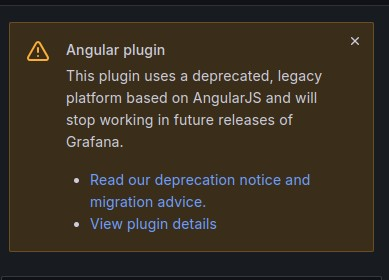
今天撈 attack map 時出現以下訊息


這個plugin使用的方法要被官方終止支援了
官方提供了 geomap來取代使用
試了半天
圖就是出不來
後來才找到問題


fotmat這裡一定要選 Table
不然在右方的選項會找不到值

2024/03/13

fortiet 如何在命令列踢掉 vpn user

首先列出目前所有連線 找出相對應的 index id

FG60F # execute vpn sslvpn list 
SSL-VPN Login Users:
 Index User Group Auth Type Timeout Auth-Timeout From HTTP in/out HTTPS in/out Two-factor Auth
 1  a1234  sslvpn-group-full-tunnel 16(1) 295 28501 192.168.12.12 0/0 0/0 0

SSL-VPN sessions:
 Index User Group Source IP Duration I/O Bytes Tunnel/Dest IP 
 1  a1234  sslvpn-group-full-tunnel 192.168.12.12  299 324697/1609215 172.17.0.51


執行以下指令刪除要踢掉的 id

FG60F # execute vpn sslvpn del-tunnel 1

2024/03/11

如何使用 sshpass在sudo時自動輸入密碼
範例如下

sshpass -p "passwd" ssh user@10.0.0.1 "echo passwd | sudo -S apt -y upgrade"

2024/03/10

linux 如果要直接使用整個HD
可以不用先分割磁區 直接mkfs即可

mkfs.xfs /dev/sdb

mount -t xfs /dev/sdb /mnt

mkfs.ext4 /dev/sdc

mount -t ext4 /dev/sdc /mnt

2024/03/05

linux在開几時要mount iscsi時
/etc/fstab使用 defaults 會無法開几


UUID=c46a08a2-160a-4345-9e96-8ebc35ff2220 /home                       xfs     defaults,uquota        0 0

要改成 _netdev 在網路啟動後再mount 就沒問題了

UUID=c46a08a2-160a-4345-9e96-8ebc35ff2220 /home                       xfs     _netdev,uquota


2024/02/29

最近要進行mail server移轉
在新server上安裝完 dovecot後
改完 /etc/dovecot/dovecot.conf

protocols = imap pop3

重啟發現 port 993 995 還是會 listen

只能修改
/etc/dovecot/conf.d/10-master.conf
的二個地方 把port 改成 0 才有作用
service imap-login {
  inet_listener imap {
    #port = 143
  }
  inet_listener imaps {
    port = 0
    #ssl = yes
  }

service pop3-login {
  inet_listener pop3 {
    #port = 110
  }
  inet_listener pop3s {
    port = 0
    #ssl = yes
  }
}

2024/02/26

總結一下目前如何在client 使用winget 定期更新
在目前原有的使用者上建立排程
單位內的使用者95%以上都使用 abc 這個帳號 
所以把排程建在 abc 這個user上

加入以下的 reg 以達成以下二個作用

bypass MicrosoftStore Certificate 
關閉安裝軟体時的UAC 以避免一直跳出視窗要user按確定

Windows Registry Editor Version 5.00


[HKEY_LOCAL_MACHINE\SOFTWARE\Policies\Microsoft\Windows\AppInstaller]
"EnableBypassCertificatePinningForMicrosoftStore"=dword:00000001


[HKEY_LOCAL_MACHINE\SOFTWARE\Microsoft\Windows\CurrentVersion\Policies\System]
"ConsentPromptBehaviorAdmin"=dword:00000000


為了不要讓user看到排程執行時的DOS視窗 因此批次檔要以 vbs 進行呼叫

Set ws = CreateObject("Wscript.Shell")
ws.run "cmd /c C:\ProgramData\wingetgo.vbs",vbhide


接下來建立排程

schtasks /create /tn "winget4update task" /tr "C:\ProgramData\wingetgo.vbs" /sc weekly /d MON /st 09:00 /ru abc /f

因為每個user都會改密碼 所以沒辦法建立不登入時也能執行的排程
還有一個問題就是如果user沒有登入網路 執行也不會成功


整個由eset主按台派送的工作如下

curl -o %temp%\winget.reg http://10.0.0.1:3128/i/o/winget.reg
regedit /s %temp%\winget.reg
curl -o C:\ProgramData\wingetgo.bat http://10.0.0.1:3128/i/o/wingetgo.bat
curl -o C:\ProgramData\wingetgo.vbs http://10.0.0.1:3128/i/o/wingetgo.vbs
schtasks /create /tn "winget4update task" /tr "C:\ProgramData\wingetgo.vbs" /sc weekly /d MON /st 09:00 /ru abc /f

2024/02/24

昨天一台樹莓派完全開不了几
之前就一直發生早上無法開几
必須下指令重新開關POE該 port的電力輸出
本來以為是SD卡壞了
先換一張先上線
再把這張SD卡重刷OS
又可以開几了
就先留著當備品吧
順便把poe hat 拿下來
換上poe 分電器試試看
到目前是正常

2024/02/22

ubuntu中自動播放資料夾內的所有圖片

apt install feh

feh -Z -F -D 5 /tmp/pic
在windows 排程中執行bat檔會出現dos視窗
如果要隱藏要使用 vbs
如以下範例 假設要執行的是run.bat

Set ws = CreateObject("Wscript.Shell")
ws.run "cmd /c run.bat",vbhide

存成 run.vbs
再執行run.vbs 即可

2024/02/21

之前本來想從eset的管理介面下指令在每台電腦上跑winget
但這段時間看好像都沒效果
但從管理介面看是執行成功的
請席克幫忙查一下
結果是因為主控台派下去的指令的執行身分是 system
但是用system這個身分去執行 winget 無法成功
昨天討論後
最後決定直接在每台client執行排程
試過一台沒問題
今天把辦公室的几器全部加入排程
明天中午再來看看結果
今天有個新需求要記錄dns 的client query 

試了半天
只有放在這個目錄

/var/named/chroot/var/log/

才能正常的log 輪換

在/etc/named.conf加上以下這段

logging {
channel query_log {
file "/var/named/chroot/var/log/query.log" versions 3 size 1m;
severity info;
print-time yes;
};
category queries {
query_log;
};
};


versions 3 size 1m;
表示每個檔案 1m 保留3個輪換的檔案


2024/02/16

之前提到用mobaxterm連進 alpine linux 無法使用X11Forwarding的問題
解法如下
先安裝 xauth

apk add xauth

再來把 /etc/ssh/sshd_config  裡的 X11Forwarding 改成 yes

X11Forwarding yes

重啟 sshd 

rc-service sshd restart

醬就可以了

本日的ntopng 更新後又出現問題

看來是有新加了一個 ntop-license

這個套件需要新增 ntop 這個user 

而這個user要在 ntop這個 group 裡

所以出現以下錯誤

useradd: group 'ntop' does not exist


手動加上 ntop 這個group
groupadd ntop

再跑一次 update 就 ok 了

2024/02/15

最近在試alpine linux
真的很小

目前是使用 LXC 來測

記錄一下使用到的指令

改時區
ln -s /usr/share/zoneinfo/Asia/Taipei /etc/localtime

找套件 
apk search 

加套件
apk add

移除套件
apk del

查看有無更新套件
apk update

更新套件
apk upgrade

架設 vsftp server 
apk add vsftpd

加入開机啟動
rc-update add vsftpd

重啟 vsftpd
rc-service vsftpd restart

安裝好後 client 連線出現
500 OOPS: priv_sock_get_cmd

要在 /etc/vsftpd/vsftpd.conf 最後加上
seccomp_sandbox=NO  

再重啟 vsftpd
rc-service vsftpd restart

anonymous 登入後的路徑
/var/lib/ftp

查看目前所有 service 狀況
rc-status

查看目前所有開机啟動項目
rc-update

重開機 (沒有 init)
reboot 

關机
halt


沒有rc.local 

如果要開几執行指令 先下以下命令

rc-update add local default

再來在 /etc/local.d/ 這個目錄裡加上程式 記得要 chmod +x
如果是開几要執行 副檔名要加上 .start 
例如 abc.start
如果是關几前要執行 副檔名要加上 .stop
所有加上 .start 或 .stop 的檔案都會被執行 不限一個

也可以使用 crontab 的 @reboot


apk add firefox 後
使用mobaxterm無法打開 因為 無法X11 forward

2024/02/03

今天要ssh 到server時出現錯誤

ssh root@10.1.1.1
Bad packet length 1657225410.
ssh_dispatch_run_fatal: Connection to 10.1.1.1 port 22: Connection corrupted


log出現以下錯誤

Feb  3 08:10:34 mail sshd[2963]: Bad packet length 1492758558. [preauth]
Feb  3 08:10:34 mail sshd[2963]: ssh_dispatch_run_fatal: Connection from 10.1.1.2 port 38462: Connection corrupted [preauth]

最新沒改設定 是不是有更新 查了一下

2024-02-03T02:05:13+0800 DEBUG Upgraded: openssh-server-8.0p1-19.el8_9.2.x86_64

果然沒錯
但要怎麼解決呢
這台是少數在用的几台 oracle linux 8
google 了一下果然有人也碰到問題

有人提出解法

ssh -c aes256-gcm@openssh.com user@host.example.com

試了一下沒問題

或是將 aes256-gcm@openssh.com 加到 /etc/ssh/ssh_config裡的 Ciphers 的這行
如下

Ciphers aes256-gcm@openssh.com,aes128-ctr,aes192-ctr,aes256-ctr,aes128-cbc,3des-cbc


2024/01/29

ntopng版本一直停在 20240111
今天去下手動更新出現以下訊息

ntopng : Depends: pfring (= 8.6.1-8861) but 8.6.1-8845 is to be installed

apt install pfing 又出現

pfring : Depends: ndpi (= 4.8.0-4603) but 4.8.0-4608 is to be installed

然後去網站上看 ndpi 的版本是 4.8.0-4603 沒錯

查一下是什麼時候更新的

2024-01-11 03:04:15 status installed ndpi:amd64 4.8.0-4608

因為這個是ntopng 自己的 apt source list

不知道是不是官方那天搞錯後又換回來

好吧 換回舊版

apt install ndpi=4.8.0-4603

醬更新就沒問題了

2023/12/31

之前在把centos 7升級 到 almalinux 8 時一直出現

At least 1645MB more space needed on the / filesystem.

加硬碟再做還是一樣

今天再找了一下

設了一個新的參數

export LEAPP_OVL_SIZE=3500

再執行就成功了

說是xfs的問題

2023/12/29

使用xfs quota 在刪除user後 資料還是會殘留在 inode

所以 xfs_quota -x -c report /home
會出現以下的report

#1587               0     102400     107520     00 [--------]
#1588               0     102400     107520     00 [--------]
#1589               0     102400     107520     00 [--------]
#1590               0     102400     107520     00 [--------]
#1591               0     102400     107520     00 [--------]
#1592               0     204800     209920     00 [--------]
#1593               0     102400     107520     00 [--------]

目前找到的解決是只能全部清掉後再把現有的user重新設定 quota

xfs_quota -x -c "off -up" /home 
xfs_quota -x -c "remove -upg" /home
重開几或 umount 再 mount /home 後重新設定 quota


2023/12/23

今天自己試出來 graylog reopen indices 的語法

curl -v -X POST -H "Content-Type: application/json" -H "X-Requested-By: XMLHttpRequest" -u user:password http://10.0.0.1:9000/api/system/indexer/indices/graylog_245/reopen

別忘了查完要再close起來

2023/12/22

linux shell 中如果要判斷前一個指令是否執行成功
可以使用 $? 來判斷

在m$ windows中 也有一個變數名稱
%ERRORLEVEL%

但是
千萬不要使用在 bat
因為在dos 命令提示字元中都沒問題
但放在bat中就會有不同的結果

2023/12/15

最近在佈署 winget 
發現在 win10 LTSC上無法安裝執行
查了半天才發現因為 LTSC 拿掉很多東西
所以如果要執行要再手動補回去
而且補回去的順序不能錯
否則還是會無法安裝及執行

首先是要補回 msstore

https://github.com/lixuy/LTSC-Add-MicrosoftStore/archive/2019.zip
下載後解開
如果不需要付費軟体及 xbox可以把相關的檔案砍了
再以系統管理員執行
Add-Store.cmd

再來是安裝 VC++ v14 及 Microsoft.UI.Xaml

powershell add-appxpackage Microsoft.UI.Xaml.2.7.appx
powershell add-appxpackage Microsoft.VCLibs.x64.14.00.Desktop.appx

最後安裝 winget

powershell add-appxpackage Microsoft.DesktopAppInstaller_8wekyb3d8bbwe.msixbundle

切記一定要照順序

如果因為沒照順序導致無法安裝執行
要先移除 package再重裝

 先進 powershell
列出所有 package
get-appxpackage

找出 PackageFullName
get-appxpackage | findstr /i PackageFullName

移除相關的 package

Microsoft.DesktopAppInstaller_1.21.3421.0_x64__8wekyb3d8bbwe

Microsoft.VCLibs.140.00.UWPDesktop_14.0.30704.0_x64__8wekyb3d8bbwe

Microsoft.UI.Xaml.2.7_7.2109.13004.0_x64__8wekyb3d8bbwe

Remove-AppxPackage -Package "
Microsoft.DesktopAppInstaller_1.21.3421.0_x64__8wekyb3d8bbwe"

Remove-AppxPackage -Package "Microsoft.VCLibs.140.00.UWPDesktop_14.0.30704.0_x64__8wekyb3d8bbwe"

Remove-AppxPackage -Package "Microsoft.UI.Xaml.2.7_7.2109.13004.0_x64__8wekyb3d8bbwe"


再重新安裝一次


https://github.com/microsoft/winget-cli

https://github.com/microsoft/winget-cli/issues/1781

https://github.com/kkkgo/LTSC-Add-MicrosoftStore

https://www.jianshu.com/p/39cac920e42f

2023/12/10

今天在玩winget

記錄一下在 win11 碰到的問題

內建有安裝但下

winget search notepad 找不到任何東西


要安裝最新版本

https://github.com/microsoft/winget-cli/releases/


目前最新

https://github.com/microsoft/winget-cli/releases/download/v1.6.3133/Microsoft.DesktopAppInstaller_8wekyb3d8bbwe.msixbundle

下載後打開

powersell


add-appxpackage ./下載檔名                  才能安裝 

直接點二下無法安裝


裝好後無法使用 msstore 資料源

一直出現錯誤


搜尋來源時失敗: msstore

執行命令時,發生意外的錯誤:

0x8a15005e : The server certificate did not match any of the expected values.


winget source reset 也沒用

查了才發現 msstore 憑証有問題 有夠無言

下指令bypass msstore 憑証

winget settings --enable BypassCertificatePinningForMicrosoftStore

或加入以下機碼


Windows Registry Editor Version 5.00


[HKEY_LOCAL_MACHINE\SOFTWARE\Policies\Microsoft\Windows\AppInstaller]

"EnableBypassCertificatePinningForMicrosoftStore"=dword:00000001


winget install 一直跳出 UAC 畫面

安裝 gsudo 解決 

winget install gerardog.gsudo

重開几

gsudo winget upgrade --all

或

sudo winget upgrade --all


安裝時還是會跳出 gsudo 的UAC 不過只會跳一次 安裝軟体不會再跳


方便好用的工具

尤其是OS裝完後續安裝軟体


還有更新目前安裝的所有軟体

gsudo winget upgrade --all


如果不想升級某些軟体 要先 pin

winget pin add <package> --version


自動接受安裝合約

--accept-package-agreements 

2023/12/08

自從pmg升到8版後
偶爾就會出現cpu跟ram過高的問題
然後机器就會卡住無法運作


之前本來已經有寫了一支檢查程式跑在mg裡
如果收不到外面連線的log
就重啟
可是今天的狀況更嚴重
當几後mg沒法執行任何程式了
只能從 host著手
定時檢查 mg的cpu狀態
如果有問題
就從host下指令重開了
163是lxc id


#!/bin/bash

k=`/usr/bin/pvesh get /cluster/resources|grep 163|cut -d '%' -f 1|awk '{print $NF}'|cut -d '.' -f 1`

#echo $k
if [ $k -gt 96 ]; then

        echo "cpu $k mg reboot"|/usr/bin/mail -s mg_cpu_high_reboot a@bc.de
        /usr/sbin/pct stop 163
        sleep 5
        /usr/sbin/pct start 163

fi

2023/12/02

最近這几天 規定要往上指的 DNS 發生故障
重點是 發生故障也不通知下層單位
真是有夠無言的
本來沒有在監控記錄 dns query 的 response time
想說來加一下好了 加在 librenms
搞了好久
最後發現不會自動帶入 Remote Host
要在 Parameters 下完整
最終沒問題的設定方式如下圖


2023/11/22

line 傳訊息同時傳圖片


curl -X POST https://notify-api.line.me/api/notify -H 'Authorization: Bearer (your token)' -F 'message=test' -F 'imageFile=@/tmp/1122.jpg'


以上指令的 message無法換行

使用 test\n\ntest      test\\ntest 都不行

2023/11/19

 proxmox 8 安裝後修正apt source 並更新


#!/bin/bash


sed -i '1s/^/#/' /etc/apt/sources.list.d/ceph.list

sed -i '1s/^/#/' /etc/apt/sources.list.d/pve-enterprise.list


echo "deb http://download.proxmox.com/debian/pve bookworm pve-no-subscription" >> /etc/apt/sources.list


echo "export http_proxy=http://10.1.1.1:3128" > /root/update

echo "apt-get update" >> /root/update

echo "apt-get upgrade -y" >> /root/update

echo "apt-get autoremove -y --purge" >> /root/update

chmod +x /root/update

/root/update


2023/11/01

今天因為長官的命令有需求要撈graylog的舊資料

目前是設定60天後的index會自動關起來

在之前的版本如果要查舊資料

要先把index open 後 再 recalculate 才能查

但今天下指令跟在管理介面打開

在管理介面上出現的畫面不同


下指令的不會出現reopened

而且過沒多久就會自動再變成close

從管理介面操作的就會出現綠色的reopened 而且不用再 recalculate 就能直接查資料了

不過如果要打開很多index 就要一個一個點 有點麻煩

不知道有沒有其他指令能做到

2023/10/14

最近nas因為更新發生nfs不能使用的問題

因此暫時把graylog搬到其他台還沒更新的nas上

搬完後發現ES變成red


下指令看一下是那些shards


curl -XGET localhost:9200/_cat/shards|grep UNASSIGNED


index.action       0 r UNASSIGNED

index.do           0 r UNASSIGNED

index.aspx         0 r UNASSIGNED

graylog_159        2 p UNASSIGNED

index.htm          0 r UNASSIGNED

index.py           0 r UNASSIGNED

index.php          0 r UNASSIGNED

index.cgi          0 r UNASSIGNED

index.html         0 r UNASSIGNED

index.cfm          0 r UNASSIGNED

index.pl           0 r UNASSIGNED

index.jsp          0 r UNASSIGNED

index.asp          0 r UNASSIGNED


graylog_159 這個是放資料的 直接砍了 就損失一天的log

curl -XDELETE 'localhost:9200/graylog_159/'

此時ES已經變 yellow

但其他的shards也不知道砍了會不會有問題
forum上說的是因為沒有第二台可以replication所以會出現 UNASSIGNED
如果覺得礙眼不想看到 可以取消 replication
指令如下

curl -X PUT "http://localhost:9200/index_name/_settings" -H 'Content-Type: application/json' -d '{"index":{"number_of_replicas":0}}'

目前就先醬放著吧
再觀察看看


2023/08/14

之前寫過一篇有關如何在librenms加上 service 監控的
在新版本上要修正一下
目前版本

23.7.0-73-gd865e3b37 - Sun Aug 13 2023 22:56:54 GMT+0800

以ubuntu為例子
首先要安裝nagios套件

sudo apt install nagios-plugins

chmod +x /usr/lib/nagios/plugins/*

更改設定檔
vi /opt/librenms/config.php

# nagios-plugins
$config['show_services']           = 1;
$config['nagios_plugins']   = "/usr/lib/nagios/plugins";


vi /etc/cron.d/librenms

*/5  *    * * *   librenms    /opt/librenms/services-wrapper.py 1

設定完成後就會在web介面上多出 service 的選項可以使用

接下來碰到的問題是
如果把service設定到 localhost
是無法正常使用的

要新加一個device
設定為 service_chcek
然後把 snmp 及 ping check都關掉
再把service設定到 service_check 這個device上
才能正常

如果在check service 時有加上參數捉取回應時間
librenms 會自動使用這個值畫出圖
可以由此觀察服務的回應時間 看出service有沒有lag的情況


2023/08/05

最近把pmg 升到8

關機或重開的時候一直出現

fail to connect bus no such file or directory

查了一下 好像是原廠的lxc沒裝dbus

apt install -y dbus

裝完後就沒再出現了

另外原本在7版只給一個cpu運作都正常

可是在8版開机時cpu都會吃到滿然後持續一陣子

目前給二顆 運作正常

再觀察看看

2023/07/06

整理一下zap的使用

首先到

https://www.zaproxy.org/download/

選擇下載
Cross Platform Package 

OS必須要有 java環境才能執行

在debian 安裝 java指令

apt install default-jre

解壓後執行 zap.sh

會出現UI畫面 第一次執行預設會跳出更新畫面 要執行更新

更新完成後 執行zap的這台几器對外網路要關閉

因為進行scan時預設會往下爬五層

有可能會爬到外面去

因為目前沒辦法一次掃多個網站 不管是UI或使用指令

所以如果有多個網站要掃

可以使用命令模式 指令如下

./zap.sh -cmd -quickurl http://abc.com.tw -quickout /tmp/81.html


寫個shell來做

一行一個網站       

https://aa.bb.com
https://dd.ee.com

寫到  /tmp/site_to_test


#!/bin/bash

while read line
do

    echo "$line"
    ./zap.sh -cmd -quickurl "$line" -quickout /tmp/`echo $line|cut -d '/' -f 3`.html

done < /tmp/site_to_test


2023/07/05

zap目前還是沒找到能一次掃描多個url的方法
以下是命令列的指令
不呼叫 UI 執行掃描並產生報告 並在執行完成後退出

./zap.sh -cmd -quickurl http://abc.com.tw -quickout /tmp/81.html


2023/07/04

最近使用zap auto scan的時候

在全部使用預設值的情況下

不知道為什麼都會去scan外部的網站

看了一下預設的層數是5層 也不知道是不是因為這個原因

目前的做法是先把zap這台對外的網路先關掉

再觀察看看


2023/06/12

最近在幫人家改bat檔
碰到二個問題
記一下解法

wmic qfe list >> a.txt
執行以上指令時 會同時產生 ascii 和 unicode
完全無法理解為什麼會有這個問題
為了解決 可以使用以下二個語法

wmic qfe list | findstr "^" >> a.txt
或
wmic qfe list | find /v "" >> a.txt


再來是如果
echo <abc> >> a.txt
會出現錯誤
必須使用跳脫字元
echo ^<abc^> >> a.txt

再來是換行的問題
要換行可以使用
echo. >> a.txt

如果不想換行 可以使用
echo|set /p="abc" >> a.txt


2023/06/05

朋友介紹的好用免費 P2V 軟体


https://www.starwindsoftware.com/starwind-v2v-converter

2023/05/24


/usr/sbin/iptables -A INPUT -p tcp -s 192.168.1.0/24 --dport 22 -j ACCEPT
/usr/sbin/iptables -A INPUT -p tcp -s 0/0 --dport 22 -j DROP
/usr/sbin/iptables -A INPUT -s 127.0.0.1 -j ACCEPT
/usr/sbin/iptables -A INPUT -s 192.168.0.0/16 -j ACCEPT
/usr/sbin/iptables -A INPUT -s 10.0.0.0/8 -j ACCEPT

/usr/sbin/iptables -A INPUT -m state --state  ESTABLISHED -j ACCEPT
在DROP前必須加上以上這行 封包才能出去

/usr/sbin/iptables -A INPUT -s 0/0 -j DROP

2023/05/05

一直以來都會定時去 graylog 撈 資料

會使用到多個 OR 的下法

accept AND ( 192.168.33.238 OR 192.168.34.215 OR 192.168.33.43 OR 192.168.34.142 OR 192.168.54.247 OR 192.168.7.253 OR 192.168.26.237 OR 192.168.26.228 OR 192.168.25.211 OR 192.168.25.206 OR 192.168.25.117 OR 192.168.26.104 OR 192.168.25.183 OR 192.168.31.241 OR 192.168.30.112 OR 192.168.30.80 OR 192.168.29.6 OR 192.168.29.3 OR 192.168.30.60 OR 192.168.30.58 OR 192.168.29.143 OR 192.168.30.57 OR 192.168.29.223 OR 192.168.29.164 OR 192.168.29.84 OR 192.168.30.200 OR 192.168.30.32 OR 192.168.29.29 OR 192.168.29.199 OR 192.168.29.205 OR 192.168.29.210 OR 192.168.29.200 OR 192.168.29.234 OR 192.168.30.220 OR 192.168.30.194 OR 192.168.29.83 OR 192.168.29.4 OR 192.168.30.108 OR 192.168.29.177 OR 192.168.29.107 OR 192.168.29.32 OR 192.168.30.33 OR 192.168.30.173 OR 192.168.30.247 OR 192.168.30.122 OR 192.168.30.55 OR 192.168.29.19 OR 192.168.29.10 OR 192.168.30.123 OR 192.168.30.201 OR 192.168.29.253 OR 192.168.30.85 OR 192.168.29.48 OR 192.168.30.37 OR 192.168.30.66 OR 192.168.9.100 OR 192.168.30.163 OR 192.168.30.114 OR 192.168.30.59 OR 192.168.30.199 OR 192.168.30.227 OR 192.168.30.41 OR 192.168.29.246 OR 192.168.29.161 OR 192.168.74.248 OR 192.168.74.12 OR 192.168.10.111 OR 192.168.10.104 OR 192.168.50.154 OR 192.168.52.1 OR 192.168.52.3 OR 192.168.50.243 OR 192.168.50.220 OR 192.168.50.179 OR 192.168.50.99 OR 192.168.50.138 OR 192.168.50.98 OR 192.168.50.182 OR 192.168.50.206 OR 192.168.50.234 )


但今天使用同樣的語法

出現以下的 error


While retrieving data for this widget, the following error(s) occurred:

OpenSearch exception [type=too_many_nested_clauses, reason=Query contains too many nested clauses; maxClauseCount is set to 1024].


問了bing


要修改 /etc/opensearch/opensearch.yml

加上 

indices.query.bool.max_clause_count: 10240

重啟 opensearch 目前正常

2023/05/03

因應centos 7 的EOS 
最近把 grafana 轉到 debian

grafana 安裝好後移轉資料


Install used plugin on new server

    grafana-cli plugins install grafana-image-renderer
    grafana-cli plugins install grafana-clock-panel
    grafana-cli plugins install grafana-worldmap-panel

Stop Grafana service on source and destination server

Copy /var/lib/grafana/grafana.db from old to new server

Check /etc/grafana/grafana.ini

    以上copy完後要注意檔案擁有者及權限問題

Restart Grafana

Regular connection to the grafana url

Dashboard, datasource, users, psw, team,… are the same


因為之前有在本机開 influxdb
所以移轉

influxd backup /tmp/backup
    
    只備分資料結構不備分資料

influxd restore -metadir /var/lib/influxdb/meta /tmp


本來有開API給遠端撈資料
在9版之後改成 service accounts
所以直接轉換

轉後去後遠端還是撈不到資料 本來以為是key的問題
查了log才發現要補一些package

apt install libglib2.0-0
apt install libnss3
apt install libatk1.0-0
apt install libatk-bridge2.0-0
apt install libcups2
apt install libdrm2
apt install libxkbcommon0
apt install libxcomposite1
apt install libxdamage1
apt install libxfixes3
apt install libxrandr2
apt install libgbm1
apt install libpangocairo-1.0-0
apt install libasound2


目前看來是都正常了