昨天把win的log丟到log server後分析程式出現問題
就是看不到本文
所有的log變成了附件
要看的話就很麻煩
改用mutt來寄
語法跟mail其實差不多
mutt [-a 附加檔] [-i 內文檔] [-b 秘密副本] [-c 一般副本] [-s 信件標題] email位址 < mail內容
http://linux.vbird.org/linux_server/0380mail.php#mua_mutt
中文就ok了
2013/06/20

2013/06/19
早上發生一台win 2012 server 出現自動重開的情況
而重開發顯示捉不到HD
mirror box的lcd則出現rebuild的訊息
把有問題的hd先拔出後
再重開
chkdsk
service壞了好几個
看了一下log
發現昨天早上就出現hd有問題
找了一下
找到
https://code.google.com/p/eventlog-to-syslog/
http://ssorc.tw/?p=1197
這個可以把win的log丟到syslog
將 evtsys.dll 及 evtsys.exe 放至 %systemroot%system32
%systemroot%system32evtsys -i -h 1.1.1.1
net start evtsys
若要uninstall
net stop evtsys
%systemroot%system32evtsys -u
在log server上就會有記錄了
但出現的是主机名稱而不是ip
coding撈資料的時候要注意一下
而重開發顯示捉不到HD
mirror box的lcd則出現rebuild的訊息
把有問題的hd先拔出後
再重開
chkdsk
service壞了好几個
看了一下log
發現昨天早上就出現hd有問題
找了一下
找到
https://code.google.com/p/eventlog-to-syslog/
http://ssorc.tw/?p=1197
這個可以把win的log丟到syslog
將 evtsys.dll 及 evtsys.exe 放至 %systemroot%system32
%systemroot%system32evtsys -i -h 1.1.1.1
net start evtsys
若要uninstall
net stop evtsys
%systemroot%system32evtsys -u
在log server上就會有記錄了
但出現的是主机名稱而不是ip
coding撈資料的時候要注意一下
2013/06/04
前不久安裝了smokeping
補一下監控的部分
先裝上mail client
apt-get install mailutils
#vi /etc/smokeping/config.d/Alerts
*** Alerts ***
to = derek@faq-book.com #設定要收到警報信件的信箱
from = faq@faq-book.com #設定本機發信的帳號
+someloss
type = loss
# in percent
pattern = >0%,*12*,>0%,*12*,>0%
comment = loss 3 times in a row
以下為範例
+lossdetect
type = loss
# in percent
pattern = ==0%,==0%,==0%,==0%,>20%,>20%,>20%
comment =
#說明 : 這是用來偵測突然間loss封包
+miniloss
type = loss
# in percent
pattern = >0%,*4*,>0%,*4*,>0%
comment =
#說明 : 當連續兩個週期封包都有loss 4個或高於0%,且在第三個週期封包高於0 %的話就alert
+someloss
type = loss
# in percent
pattern = >20%,>20%
comment =
#說明 : 當連續兩個週期封包都Loss高於20% 時就alert
+rttdetect
type = rtt
# in milliseconds
pattern = <10,<10,<10,<10,<10,<100,>100,>100,>100
comment =
#說明: 如果當前5次延遲小於10 ms,第6次小於100 ms而從第7次開始連續三次都高於100 ms的話就alert
+rttbadstart
type = rtt
# in milliseconds
pattern = >4.5,>4.5
comment =
#說明 : 在連續兩個週期內ping值平均都高於4.5 ms時就alert
接下來要在/etc/smokeping/config.d/Targets裡
每一個要監控的device最後加上
alerts = lossdetect,miniloss <------ 加入所需要的監控條件
service smokeping restart
http://ithelp.ithome.com.tw/question/10076486
補一下監控的部分
先裝上mail client
apt-get install mailutils
#vi /etc/smokeping/config.d/Alerts
*** Alerts ***
to = derek@faq-book.com #設定要收到警報信件的信箱
from = faq@faq-book.com #設定本機發信的帳號
+someloss
type = loss
# in percent
pattern = >0%,*12*,>0%,*12*,>0%
comment = loss 3 times in a row
以下為範例
+lossdetect
type = loss
# in percent
pattern = ==0%,==0%,==0%,==0%,>20%,>20%,>20%
comment =
#說明 : 這是用來偵測突然間loss封包
+miniloss
type = loss
# in percent
pattern = >0%,*4*,>0%,*4*,>0%
comment =
#說明 : 當連續兩個週期封包都有loss 4個或高於0%,且在第三個週期封包高於0 %的話就alert
+someloss
type = loss
# in percent
pattern = >20%,>20%
comment =
#說明 : 當連續兩個週期封包都Loss高於20% 時就alert
+rttdetect
type = rtt
# in milliseconds
pattern = <10,<10,<10,<10,<10,<100,>100,>100,>100
comment =
#說明: 如果當前5次延遲小於10 ms,第6次小於100 ms而從第7次開始連續三次都高於100 ms的話就alert
+rttbadstart
type = rtt
# in milliseconds
pattern = >4.5,>4.5
comment =
#說明 : 在連續兩個週期內ping值平均都高於4.5 ms時就alert
接下來要在/etc/smokeping/config.d/Targets裡
每一個要監控的device最後加上
alerts = lossdetect,miniloss <------ 加入所需要的監控條件
service smokeping restart
http://ithelp.ithome.com.tw/question/10076486
2013/06/03
mail server一直以來發生一個問題
就是user quota爆掉後
在log就會出現
r52CXO8W032653 9968 Sun Jun 2 20:33 <notification+zrdo6rzil6le@pages.facebo
(Deferred: local mailer (/usr/bin/procmail) exited with EX_TE)
<abc@abc.com>
看起來是因為quota 爆了之後信就會卡在queue裡而不會退信
參考了一下這個
http://phorum.vbird.org/viewtopic.php?f=2&t=15986&start=0
發現解決的方法是拉大quota 的soft和hard 並把grace調為1天
這樣user就會收到quota的告警信 而且在queue裡信超過一天就會被退掉
不會塞在queue中
設定grace的指令如下
edquota -f /dev/sda1 -t
另外之前有提到當user的quota滿了之後信會寫到 /var/spool/mail
所以也順便在 /home開了一個mailq的目錄
再 ln -s /var/spool/mail /home/mailq
這樣quota就全算在一起了
就是user quota爆掉後
在log就會出現
r52CXO8W032653 9968 Sun Jun 2 20:33 <notification+zrdo6rzil6le@pages.facebo
(Deferred: local mailer (/usr/bin/procmail) exited with EX_TE)
<abc@abc.com>
看起來是因為quota 爆了之後信就會卡在queue裡而不會退信
參考了一下這個
http://phorum.vbird.org/viewtopic.php?f=2&t=15986&start=0
發現解決的方法是拉大quota 的soft和hard 並把grace調為1天
這樣user就會收到quota的告警信 而且在queue裡信超過一天就會被退掉
不會塞在queue中
設定grace的指令如下
edquota -f /dev/sda1 -t
另外之前有提到當user的quota滿了之後信會寫到 /var/spool/mail
所以也順便在 /home開了一個mailq的目錄
再 ln -s /var/spool/mail /home/mailq
這樣quota就全算在一起了
2013/05/31
aruba campus ap改成remote ap的步驟

在configuration > security > authentication > internal DB
加入username password
role選擇authenticated

configuration > Advanced Services > VPN Services
加上address pool
及IKE Shared Secrets
再來
configuration > wireless > ap installation
選要改為remote ap的ap按下 provision

選擇 remote ap
打入 之前的IKE PSK
取消 Use Automatic Generation
打入 username password
重新修改ap的ip相關資料
PS 無法直接從ap的console改成remote ap 一定要先定義成campus ap再由controller改為 remote ap
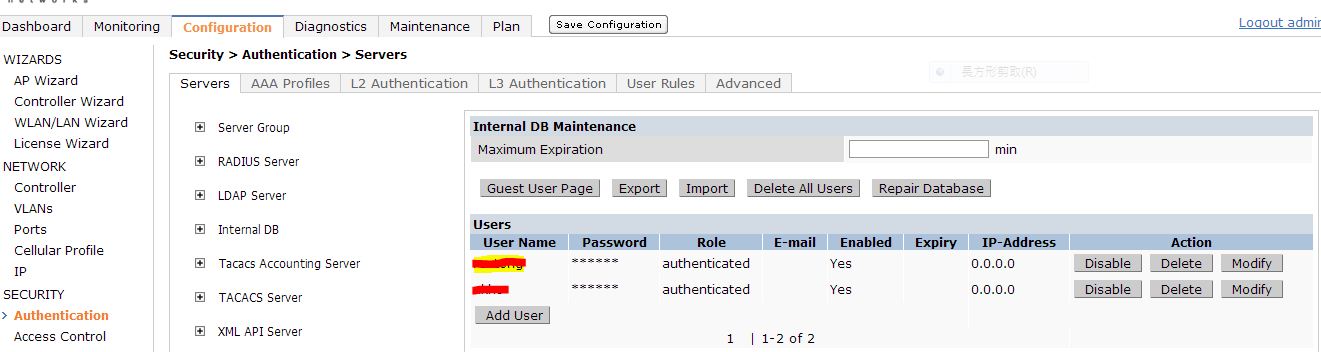
在configuration > security > authentication > internal DB
加入username password
role選擇authenticated

configuration > Advanced Services > VPN Services
加上address pool
及IKE Shared Secrets
再來
configuration > wireless > ap installation
選要改為remote ap的ap按下 provision

選擇 remote ap
打入 之前的IKE PSK
取消 Use Automatic Generation
打入 username password
重新修改ap的ip相關資料
PS 無法直接從ap的console改成remote ap 一定要先定義成campus ap再由controller改為 remote ap
2013/05/30
2013/05/28
以下是如何在fortiget開啟debug並經由GUI的設定過程得到script的步驟
把script存檔
之後就可以經由修改存下來的檔案
使用ssh經由forti clinet來下指令了
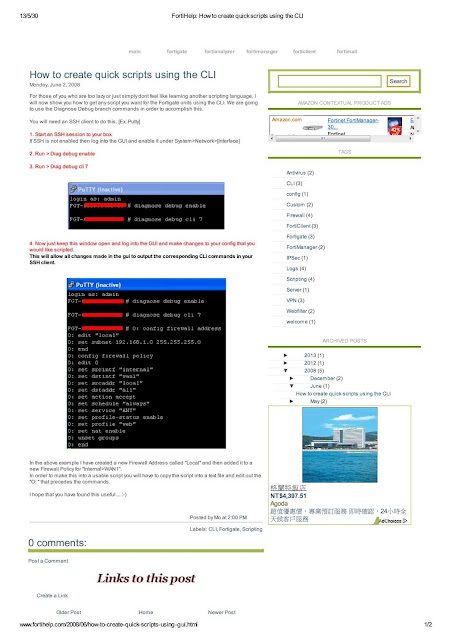
http://www.fortihelp.com/2008/06/how-to-create-quick-scripts-using-gui.html
把script存檔
之後就可以經由修改存下來的檔案
使用ssh經由forti clinet來下指令了

http://www.fortihelp.com/2008/06/how-to-create-quick-scripts-using-gui.html
FWS 624升級firmware後client拿不到ip 的問題終於有了解答
目前使用的 FGS04302c.bin這個版本在打開dhcp snooping的時候
並不會在dhcp的封包加上option 82的訊息
但之後的版本會
如下圖所示
 而封包向上流會經過cisco 3750
問題就來了 cisco預設會丟棄含有option 82的封包
但有指令可以讓cisco不做check
目前使用的 FGS04302c.bin這個版本在打開dhcp snooping的時候
並不會在dhcp的封包加上option 82的訊息
但之後的版本會
如下圖所示

問題就來了 cisco預設會丟棄含有option 82的封包
但有指令可以讓cisco不做check
ip dhcp relay information trust-all (全域)
或
ip dhcp relay information trusted (每埠或vlan)
但目前在cisco 3750上又開啟了dhcp snooping
導致以上二個指令在這種情況是無法作用的
接下來就只剩一個解法了
在brocade的每一個port加上
no dhcp snooping relay information
讓brocade不要在封包加上option 82
問題是這個指令無法使用 int e 0/1/1 to 0/1/24 來下
要一個port 一個port下
有一千多個port 喔
想到就累 @@
2013/05/26
升到proxmox 3.0後
發生一個很嚴重的問題
所有的nfs竟然都mount不上
在server上出現以下的log
May 26 06:56:00 proxmox30 pvestatd[5548]: WARNING: mount error: mount.nfs: an incorrect mount option was specified
初步看來是mount nfs是有一個option有問題
可是在proxmox的管理介面上並沒有地方可以設定mount nfs的option
應該要進os手動去改了
再仔細查了一下
因為proxmox 3.0的os已經升成debian 7.0了
而原來的要mout nfs所使用的portmap已經換成rpcbind 導致必須設定某些參數才能使用
進os手動去下mount nfs時出現
mount.nfs: rpc.statd is not running but is required for remote locking.
mount.nfs: Either use '-o nolock' to keep locks local, or start statd.
mount.nfs: an incorrect mount option was specified
而原來所使用的/etc/pve/storage.cfg並沒有設定nolock這個option
而如上所述在proxmox的管理介面上也沒有地方可以加option
只好手動來了
在/etc/pve/storage.cfg上所有有關nfs的storage上手動加上 options nolock
範例如下
nfs: nfs104_iso
path /mnt/pve/nfs104_iso
server 1.1.1.104
export /mnt/vm_data/ISO
options nolock
content iso
reboot或是
/etc/init.d/rpcbind restart
/etc/init.d/nfs-common restart
就可以了
發生一個很嚴重的問題
所有的nfs竟然都mount不上
在server上出現以下的log
May 26 06:56:00 proxmox30 pvestatd[5548]: WARNING: mount error: mount.nfs: an incorrect mount option was specified
初步看來是mount nfs是有一個option有問題
可是在proxmox的管理介面上並沒有地方可以設定mount nfs的option
應該要進os手動去改了
再仔細查了一下
因為proxmox 3.0的os已經升成debian 7.0了
而原來的要mout nfs所使用的portmap已經換成rpcbind 導致必須設定某些參數才能使用
進os手動去下mount nfs時出現
mount.nfs: rpc.statd is not running but is required for remote locking.
mount.nfs: Either use '-o nolock' to keep locks local, or start statd.
mount.nfs: an incorrect mount option was specified
而原來所使用的/etc/pve/storage.cfg並沒有設定nolock這個option
而如上所述在proxmox的管理介面上也沒有地方可以加option
只好手動來了
在/etc/pve/storage.cfg上所有有關nfs的storage上手動加上 options nolock
範例如下
nfs: nfs104_iso
path /mnt/pve/nfs104_iso
server 1.1.1.104
export /mnt/vm_data/ISO
options nolock
content iso
reboot或是
/etc/init.d/rpcbind restart
/etc/init.d/nfs-common restart
就可以了
2013/05/23
為了監控RTT的狀況
安裝smokeping來用
之前有裝過
但移机時沒有移到 不知道到那裡去了
考慮到安裝方便性
直接使用ubuntu 12.04
os裝好後
apt-get install smokeping就ok了
但有二個問題
第一是smokeping預設要使用sendmail來發信
如果沒有裝 會有錯誤訊息
但相依性並沒有檢查到
所以要再手動
apt-get install sendmail
第二是
rrd檔的預設路徑在 /var/lib/smokeping
可是安裝時並未建立Local這個資料夾
所以要再手動建立並把owner改為smokeping.smokeping
或直接chmod -R 777
config路徑為
/etc/smokeping/config.d
主要修改Targets這個檔案就可以了
改完後一定要 service smokeping restart
安裝smokeping來用
之前有裝過
但移机時沒有移到 不知道到那裡去了
考慮到安裝方便性
直接使用ubuntu 12.04
os裝好後
apt-get install smokeping就ok了
但有二個問題
第一是smokeping預設要使用sendmail來發信
如果沒有裝 會有錯誤訊息
但相依性並沒有檢查到
所以要再手動
apt-get install sendmail
第二是
rrd檔的預設路徑在 /var/lib/smokeping
可是安裝時並未建立Local這個資料夾
所以要再手動建立並把owner改為smokeping.smokeping
或直接chmod -R 777
config路徑為
/etc/smokeping/config.d
主要修改Targets這個檔案就可以了
改完後一定要 service smokeping restart
2013/05/18

之前開始使用snort來detect port scan之後
所有ip都有記錄起來
今天想到是不是可以把這些ip直接畫在地圖上
這樣出來的圖應該很美 :D
於是找到了這個網站
http://freegeoip.net/
只要把ip貼上
就可以拿到有關這個ip的相關地圖資料(包含經緯度)
使用 wget 指令
http://freegeoip.net/{format}/{ip_or_hostname}
Supported formats are csv, xml or json.
wget http://freegeoip.net/csv/$i -O ip_tmp
cat ip_tmp |cut -d "," -f 8,9 >> map
單獨取出經緯度
這樣就可以畫在地圖上了
接下來到這個網站
http://gissrv4.sinica.edu.tw/gis/tools/geocoding.aspx
把上面產生出來的map資料貼上去

大功告成
再來就是思考要怎麼自動化了
所有ip都有記錄起來
今天想到是不是可以把這些ip直接畫在地圖上
這樣出來的圖應該很美 :D
於是找到了這個網站
http://freegeoip.net/
只要把ip貼上
就可以拿到有關這個ip的相關地圖資料(包含經緯度)
使用 wget 指令
http://freegeoip.net/{format}/{ip_or_hostname}
Supported formats are csv, xml or json.
wget http://freegeoip.net/csv/$i -O ip_tmp
cat ip_tmp |cut -d "," -f 8,9 >> map
單獨取出經緯度
這樣就可以畫在地圖上了
接下來到這個網站
http://gissrv4.sinica.edu.tw/gis/tools/geocoding.aspx
把上面產生出來的map資料貼上去

大功告成
再來就是思考要怎麼自動化了
snmp oid
counter32 和counter64的區別
counter32 其能表示最大值为2^32Byte=4GB
counter64 最大值为16EB
值的概念是如果giga滿載 counter64要4000多年才能達到
但是如果是counter32的呢 giga滿載只要32秒即可達到此值 而到達後值就會reset
因此就會造成cacti出現一支一支白白的情況
建議是流量超過100MB的話一定要使用counter64
snmp v2才支援counter64
當然重點是設備要有支援
http://gaogo.blog.51cto.com/801285/1172834
counter32 和counter64的區別
counter32 其能表示最大值为2^32Byte=4GB
counter64 最大值为16EB
值的概念是如果giga滿載 counter64要4000多年才能達到
但是如果是counter32的呢 giga滿載只要32秒即可達到此值 而到達後值就會reset
因此就會造成cacti出現一支一支白白的情況
建議是流量超過100MB的話一定要使用counter64
snmp v2才支援counter64
當然重點是設備要有支援
http://gaogo.blog.51cto.com/801285/1172834
2013/05/14
有關rspan的config方法如下
前提是二台switch要用trunk連結
不能使用routing模式
使用RSPAN監聽switch A連接server端的實例:
switch A配置如下:
!
vlan 925
remote-span
monitor session 1 source interface FastEthernet1/1 both
monitor session 1 destination remote vlan 925
!
switch B配置如下:
!
vlan 925
remote-span
monitor session 1 source remote vlan 925
monitor session 1 destination interface Fastethernet 2/2
若在switch B上需要再加上一個port來monitor
則再加上
monitor session 2 source interface Gi1/1
monitor session 2 destination remote vlan 925
把 gi1/1的流量也丟到vlan 925
再把vlan 925 導出來
亦即 vlan 925視為一個pool
跨不同的switch 但所有的switch 都必須設定vlan 925且定義為remote-span
可以把所有要monitor的流量丟進去
最後再導出來
http://tc.wangchao.net.cn/bbs/detail_1628933.html
rspan無法在routing架構下使用
必須使用erspan來達成
前提是二台switch要用trunk連結
不能使用routing模式
使用RSPAN監聽switch A連接server端的實例:
switch A配置如下:
!
vlan 925
remote-span
monitor session 1 source interface FastEthernet1/1 both
monitor session 1 destination remote vlan 925
!
switch B配置如下:
!
vlan 925
remote-span
monitor session 1 source remote vlan 925
monitor session 1 destination interface Fastethernet 2/2
若在switch B上需要再加上一個port來monitor
則再加上
monitor session 2 source interface Gi1/1
monitor session 2 destination remote vlan 925
把 gi1/1的流量也丟到vlan 925
再把vlan 925 導出來
亦即 vlan 925視為一個pool
跨不同的switch 但所有的switch 都必須設定vlan 925且定義為remote-span
可以把所有要monitor的流量丟進去
最後再導出來
http://tc.wangchao.net.cn/bbs/detail_1628933.html
rspan無法在routing架構下使用
必須使用erspan來達成
2013/05/13
2013/05/12
開始使用http://www.network-weathermap.com/
來畫出即時的流量圖
因為不想跟cacti整合
所以用stand alone來跑
以下的安裝教學還滿詳細的
http://www.cactifans.org/index.php/2011/04/cacti%E6%8F%92%E4%BB%B6%E8%AF%A6%E8%A7%A3-weathermap/
如果本來已經有裝好cacti 則要再加裝php5-gd 及php-pear
也建議先裝好cacti再來裝weathermap 因為直接使用cacti所產生的rrd資料檔來畫圖會方便許多
在執行http://xxx.xxx.xxx.xxx/weathermap/editor.php時
link的部分設定要注意的地方如下

Bandwidth要依照現實環境修改
Data Source的地方請至cacti找出要使用的port的rrd file再填入絶對路徑
此外建立link時第一個點選的node就是要使用該port資料的node
建立後在config內的資料如下
LINK node1-node2
TARGET /var/www/html/cacti-0.8.8a/rra/1.1.1.1_traffic_in_467.rrd
NODES 3750 7609
BANDWIDTH 1G
請注意 TARGET /var/www/html/cacti-0.8.8a/rra/1.1.1.1_traffic_in_467.rrd
就是 3750 上要使用的port的資料(跟7609的link port)
如果發現資料流方向相反 請手動修正 NODES的順序
接下來如果依照上述文件來跑crontab
*/5 * * * * root /usr/bin/php /var/www/html/weathermap/weathermap --config /var/www/html/weathermap/configs/simple.conf --image-uri ../weathermap/test.png
我的操作結果是圖完全無法產生
但手動下指令是ok的
感覺上好像跟要使用lib的路徑有關
目前的解決方式是先寫一個shell如下
#!/bin/bash
cd /var/www/weathermap
/usr/bin/php weathermap --config configs/simple.conf --output weathermap.png --htmloutput index.html
再用crontab跑這個shell
config有很多地方可以細調
詳細的config資料如下
http://www.network-weathermap.com/manual/latest/pages/config-reference.html#GLOBAL_FONTDEFINE
若要更換不同的ICON
要放到images這個資料夾並使用PNG檔
大小無所謂
因為config裡可以設定
以下的教學檔也不錯
http://blog.163.com/fan_yishan/blog/static/476922132010994424449/
修改圖例相對應的參數如下圖所示

來畫出即時的流量圖
因為不想跟cacti整合
所以用stand alone來跑
以下的安裝教學還滿詳細的
http://www.cactifans.org/index.php/2011/04/cacti%E6%8F%92%E4%BB%B6%E8%AF%A6%E8%A7%A3-weathermap/
如果本來已經有裝好cacti 則要再加裝php5-gd 及php-pear
也建議先裝好cacti再來裝weathermap 因為直接使用cacti所產生的rrd資料檔來畫圖會方便許多
在執行http://xxx.xxx.xxx.xxx/weathermap/editor.php時
link的部分設定要注意的地方如下

Bandwidth要依照現實環境修改
Data Source的地方請至cacti找出要使用的port的rrd file再填入絶對路徑
此外建立link時第一個點選的node就是要使用該port資料的node
建立後在config內的資料如下
LINK node1-node2
TARGET /var/www/html/cacti-0.8.8a/rra/1.1.1.1_traffic_in_467.rrd
NODES 3750 7609
BANDWIDTH 1G
請注意 TARGET /var/www/html/cacti-0.8.8a/rra/1.1.1.1_traffic_in_467.rrd
就是 3750 上要使用的port的資料(跟7609的link port)
如果發現資料流方向相反 請手動修正 NODES的順序
接下來如果依照上述文件來跑crontab
*/5 * * * * root /usr/bin/php /var/www/html/weathermap/weathermap --config /var/www/html/weathermap/configs/simple.conf --image-uri ../weathermap/test.png
我的操作結果是圖完全無法產生
但手動下指令是ok的
感覺上好像跟要使用lib的路徑有關
目前的解決方式是先寫一個shell如下
#!/bin/bash
cd /var/www/weathermap
/usr/bin/php weathermap --config configs/simple.conf --output weathermap.png --htmloutput index.html
再用crontab跑這個shell
config有很多地方可以細調
詳細的config資料如下
http://www.network-weathermap.com/manual/latest/pages/config-reference.html#GLOBAL_FONTDEFINE
若要更換不同的ICON
要放到images這個資料夾並使用PNG檔
大小無所謂
因為config裡可以設定
以下的教學檔也不錯
http://blog.163.com/fan_yishan/blog/static/476922132010994424449/
修改圖例相對應的參數如下圖所示

2013/05/10
因為使用thunderbird
一直有個地方感覺不是很方便
就是每次回信或是寫信時對方的title及問候語都要再打一次
有點煩
找到了 Quicktext這個plugin
用起來還不錯
http://extensions.hesslow.se/extension/4/Quicktext/
一直有個地方感覺不是很方便
就是每次回信或是寫信時對方的title及問候語都要再打一次
有點煩
找到了 Quicktext這個plugin
用起來還不錯
http://extensions.hesslow.se/extension/4/Quicktext/
2013/05/07
cisco提供二個方式來解決遠端mirror的問題
就是把遠端switch某一個port 或 vlan的流量mirror到近端來
如果是vlan架構 使用rspan
如果不是 就必須使用erspan來達成
http://www.cisco.com/en/US/docs/switches/lan/catalyst6500/ios/12.2SX/configuration/guide/span.html#wp1063324
就是把遠端switch某一個port 或 vlan的流量mirror到近端來
如果是vlan架構 使用rspan
如果不是 就必須使用erspan來達成
http://www.cisco.com/en/US/docs/switches/lan/catalyst6500/ios/12.2SX/configuration/guide/span.html#wp1063324
2013/05/06

2013/05/04
今天思考了一下port scan的問題
除了之前使用psad外
是否有更有效的方法來處理
找到了snort原來就有這個功能
只是default是關的
要在snort.conf打開
範例如下
# Portscan detection. For more information, see README.sfportscan
preprocessor sfportscan: proto { all } memcap { 10000000 } sense_level { high } logfile { /var/log/snort/portscan.log } ignore_scanners { 192.168.0.0/16, 10.0.0.0/8 } ignore_scanned { 192.168.0.0/16 }
詳細的config設定參考以下連結
http://manual.snort.org/node78.html
一樣目前打算跟LP共同運作
除了之前使用psad外
是否有更有效的方法來處理
找到了snort原來就有這個功能
只是default是關的
要在snort.conf打開
範例如下
# Portscan detection. For more information, see README.sfportscan
preprocessor sfportscan: proto { all } memcap { 10000000 } sense_level { high } logfile { /var/log/snort/portscan.log } ignore_scanners { 192.168.0.0/16, 10.0.0.0/8 } ignore_scanned { 192.168.0.0/16 }
詳細的config設定參考以下連結
http://manual.snort.org/node78.html
一樣目前打算跟LP共同運作
2013/05/02
說一下最近碰到的aruba ap的情況
有二個在同一棟大樓的ap發生ping不到的情況
原本以為是ap故障
但從controller上看ap正常工作
但從別的網段就是ping不到 改ip也不行
跟網路設備廠商討論過後認為是ap有問題導致封包送不到gateway
所以建議我換一顆
真的換一顆就好了
接下來把換下來的那顆reset為原廠default值
重新設定後
到另一顆有問題的地方換上
還是ping不到
所以只好再找一顆換上
就正常了
但真的是ap有問題嗎
把這二個ap的其中一個再reset為原廠default值
重新設定後
把辦公室原本正常的ap換下來
也是正常的
問了無線及網路設備廠商都無法解釋這個問題
還是無解
有二個在同一棟大樓的ap發生ping不到的情況
原本以為是ap故障
但從controller上看ap正常工作
但從別的網段就是ping不到 改ip也不行
跟網路設備廠商討論過後認為是ap有問題導致封包送不到gateway
所以建議我換一顆
真的換一顆就好了
接下來把換下來的那顆reset為原廠default值
重新設定後
到另一顆有問題的地方換上
還是ping不到
所以只好再找一顆換上
就正常了
但真的是ap有問題嗎
把這二個ap的其中一個再reset為原廠default值
重新設定後
把辦公室原本正常的ap換下來
也是正常的
問了無線及網路設備廠商都無法解釋這個問題
還是無解
2013/04/30
aruba ap更換流程如下
1. ap reset為default
2.設定ip等相關資訊
3. 換上後controller會出現重複的訊息

4.進到 monitoring - all access points
選擇重複未使用的那個ap 點選畫面最右方的 clear

1. ap reset為default
2.設定ip等相關資訊
3. 換上後controller會出現重複的訊息

4.進到 monitoring - all access points
選擇重複未使用的那個ap 點選畫面最右方的 clear

2013/04/29
如何reset aruba ap 為原廠預設值
1. Connect the serial console breakout adapter cable to the AP Ethernet port and your PC/Laptop
2. Power on the AP and get into apboot mode. You'll see the option to go into AP boot mode when the AP is booting. You will have to press Enter within a 1 second window so pay attention to console messages during bootup.
3. From the apboot prompt, enter the following commands
apboot> factory_reset
apboot> purgeenv
apboot> save
apboot> boot
http://geekbuddy.blogspot.tw/2011/12/how-to-reset-aruba-networks-ap105-to.html
1. Connect the serial console breakout adapter cable to the AP Ethernet port and your PC/Laptop
2. Power on the AP and get into apboot mode. You'll see the option to go into AP boot mode when the AP is booting. You will have to press Enter within a 1 second window so pay attention to console messages during bootup.
3. From the apboot prompt, enter the following commands
apboot> factory_reset
apboot> purgeenv
apboot> save
apboot> boot
http://geekbuddy.blogspot.tw/2011/12/how-to-reset-aruba-networks-ap105-to.html
2013/04/21
2013/04/19
今天一直在try jw player的caption的功能
後來發現改6版後這個功能好像還沒好
又查到html 5
才知道html 5 video這個tag現在已經支援 track的功能了
語法如下
<video id="mainvideo" controls autoplay loop>
<source src="a.mp4">
<track src="a.vtt" srclang="en" label="English" kind="caption" default>
</track>
</video>
vtt的格式如下
WEBVTT
00:00:10.000 --> 00:00:12.500
aaaaaaaaaaaaaaaaaaaaaaaaaaaaaaaaaa
00:00:13.200 --> 00:00:16.900
bbbbbbbbbbbbbbbbbbbbbbbbbbbbbbbbbb.
方便
後來發現改6版後這個功能好像還沒好
又查到html 5
才知道html 5 video這個tag現在已經支援 track的功能了
語法如下
<video id="mainvideo" controls autoplay loop>
<source src="a.mp4">
<track src="a.vtt" srclang="en" label="English" kind="caption" default>
</track>
</video>
vtt的格式如下
WEBVTT
00:00:10.000 --> 00:00:12.500
aaaaaaaaaaaaaaaaaaaaaaaaaaaaaaaaaa
00:00:13.200 --> 00:00:16.900
bbbbbbbbbbbbbbbbbbbbbbbbbbbbbbbbbb.
方便
2013/04/17
今天在找能方便stream video或 audio的方法
找到以下這個軟体,看來相當方便
http://www.subsonic.org/pages/index.jsp
各平台都有
教學如下
http://santakcool.pixnet.net/blog/post/34611263-subsonic%E9%9B%B2%E7%AB%AF%E9%9F%B3%E6%A8%82%E4%BC%BA%E6%9C%8D%E5%99%A8
以下是解決30天試用的方法
https://gist.github.com/andycandet/1611509
windows的host在 windows/system32/drive/etc下
原生不支援rm 以下是解決方法
http://howto.kouwua.net/2012/03/how-to-make-subsonic-support-rm-and.html
外掛字幕還沒找到方法處理
找到以下這個軟体,看來相當方便
http://www.subsonic.org/pages/index.jsp
各平台都有
教學如下
http://santakcool.pixnet.net/blog/post/34611263-subsonic%E9%9B%B2%E7%AB%AF%E9%9F%B3%E6%A8%82%E4%BC%BA%E6%9C%8D%E5%99%A8
以下是解決30天試用的方法
https://gist.github.com/andycandet/1611509
windows的host在 windows/system32/drive/etc下
原生不支援rm 以下是解決方法
http://howto.kouwua.net/2012/03/how-to-make-subsonic-support-rm-and.html
外掛字幕還沒找到方法處理
2013/04/09
2013/04/08
2013/04/03
2013/04/01
qm shutdown windows時會出現無法shutdown的問題
必須修改windows 的設定
必須修改windows 的設定
- Start / Run / gpedit.msc
- Drill into Computer Configuration / Windows Settings / Security Settings / Local Policies / Security Options. Find the entry named "Shutdown: Allow system to be shut down without having to log on". Double click on it, change it to "Enabled".
- Drill into Computer Configuration / Administrative Templates / System. Find the entry named "Display Shutdown Event Tracker". Double click on it, change it to "Disabled".
linux則需安裝acpid
2013/03/31
eyeD3
文字介面下改mp3 id3的好工具
指令如下 一定要加--set-encoding=utf8 否則中文會有問題
eyeD3 --set-encoding=utf8 --to-v2.4 -t 中 a.mp3
http://eyed3.nicfit.net/
文字介面下改mp3 id3的好工具
指令如下 一定要加--set-encoding=utf8 否則中文會有問題
eyeD3 --set-encoding=utf8 --to-v2.4 -t 中 a.mp3
http://eyed3.nicfit.net/
2013/03/30
以下這個範例是每五秒鐘reload一次iframe 而不重load整個頁面的方法
<iframe id="frame1" width="640" height="360" src="http://www.youtube.com/embed/8TeeJvcBdLA?rel=0&autoplay=1" frameborder="0" allowfullscreen></iframe>
<script type="text/javascript">
function refreshiframe()
{
parent.frame1.location.href="http://www.youtube.com/embed/8TeeJvcBdLA?rel=0&autoplay=1"
setTimeout("refreshiframe()",5000);
}
</script>
<body onload="refreshiframe();">
2013/03/28
應該是有一顆ap壞了
要更換之前新ap設定如下
1. 準備一條SOE線, 並連好PC RS232 與 AP EtherNet PORT
2. 超級終端機 設定為9600,N,8,1
3.插入AP 電源後, 連按ENTER鍵 以進入 apboot mode
4. 設定指令如下:
print \\先看現有設定
setenv name AP-XXX \\設定AP名稱
setenv group aruba-group \\設定群組
setenv master x.x.x.x \\設定Conterller IP
setenv serverip x.x.x.x \\設定Conterller IP
setenv ipaddr x.x.x.x \\設定AP IP
setenv netmask 255.255.255.x \\ 設定AP netmask
setenv gatewayip x.x.x.x \\ 設定AP Gateway
save
5. 若是想設成DHCP則是 不加參數
setenv ipaddr
setenv netmask
setenv gatewayip
http://blog.jpps.tc.edu.tw/lifetype/post/2/1812
後記
早上花了一個早上的時間測試
switch的灯號有亮
但就是沒有poe的供電
最後使用dsp 4300測試後發現線路是fail
懷疑是outlet壞了
換一顆後目前正常
觀察中
要更換之前新ap設定如下
1. 準備一條SOE線, 並連好PC RS232 與 AP EtherNet PORT
2. 超級終端機 設定為9600,N,8,1
3.插入AP 電源後, 連按ENTER鍵 以進入 apboot mode
4. 設定指令如下:
print \\先看現有設定
setenv name AP-XXX \\設定AP名稱
setenv group aruba-group \\設定群組
setenv master x.x.x.x \\設定Conterller IP
setenv serverip x.x.x.x \\設定Conterller IP
setenv ipaddr x.x.x.x \\設定AP IP
setenv netmask 255.255.255.x \\ 設定AP netmask
setenv gatewayip x.x.x.x \\ 設定AP Gateway
save
5. 若是想設成DHCP則是 不加參數
setenv ipaddr
setenv netmask
setenv gatewayip
http://blog.jpps.tc.edu.tw/lifetype/post/2/1812
後記
早上花了一個早上的時間測試
switch的灯號有亮
但就是沒有poe的供電
最後使用dsp 4300測試後發現線路是fail
懷疑是outlet壞了
換一顆後目前正常
觀察中
2013/03/27
一直有user抱怨連不上ap
怪的是同一個ap上其他的机器連線都沒問題
查看了一下controller
發現這些机器的retry都很高
找了半天有沒有可以在client顯示連線狀態的工具
最後發現直接使用wireshark可能比較快
filter使用的參數如下連結
http://www.wireshark.org/docs/dfref/w/wlan.html
問題是retry太高到底是網卡有問題還是driver要更新
也有人建議把nb的blue tooth關掉會好一點
反正目前看起來最大的可能性就是aruba跟某些廠牌的網卡就是不合
XD
怪的是同一個ap上其他的机器連線都沒問題
查看了一下controller
發現這些机器的retry都很高
找了半天有沒有可以在client顯示連線狀態的工具
最後發現直接使用wireshark可能比較快
filter使用的參數如下連結
http://www.wireshark.org/docs/dfref/w/wlan.html
問題是retry太高到底是網卡有問題還是driver要更新
也有人建議把nb的blue tooth關掉會好一點
反正目前看起來最大的可能性就是aruba跟某些廠牌的網卡就是不合
XD
2013/03/25
昨天一個親戚裝ap
因為不想使用mac filter
還要維護
所以用了加密
至於要選那一個
請參考以下的連結
WEP一定不能用
WAP WAP2不要使用TKIP
http://www.techbang.com/posts/7722-adv-research-wireless-encryption-the-same-speed-iqmore
因為不想使用mac filter
還要維護
所以用了加密
至於要選那一個
請參考以下的連結
WEP一定不能用
WAP WAP2不要使用TKIP
http://www.techbang.com/posts/7722-adv-research-wireless-encryption-the-same-speed-iqmore
2013/03/23
2013/03/21
如何處理office365密碼複雜度的方法如下
首先,修改密碼的 PowerShell 命令為:
Set-MsolUserPassword -UserPrincipalName test@miniasp.com -NewPassword SimplePW123
但若密碼太過簡單,就會出現以下錯誤訊息:
Set-MsolUserPassword : You must choose a strong password that contains 9 to 16 characters, a combination of letters, and at least one number or symbol. Choose another password and try again.
如果要暫時解除使用者的密碼複雜度要求,可以執行以下 PowerShell 命令完成:
Set-MsolUser -UserPrincipalName test@miniasp.com -StrongPasswordRequired $False
而當我設定密碼後,會再將此設定調回來,確保使用者自行密碼重設時,可以設定一組夠強的密碼。
Set-MsolUser -UserPrincipalName test@miniasp.com -StrongPasswordRequired $True
重整一下需求:
客戶提供帳號清單,包含預設密碼
建立帳號時,須設定使用者可用預設密碼登入
使用者首次登入必須被要求變更預設密碼
使用者變更密碼時必須強迫套用 Office 365 預設的密碼複雜度要求
最後,完成一位使用者的 PowerShell 指令碼如下:
Set-MsolUser -UserPrincipalName a@a.com -StrongPasswordRequired $False
Set-MsolUserPassword -UserPrincipalName a@a.com -NewPassword 123 -ForceChangePassword $True
Set-MsolUser -UserPrincipalName a@a.com -StrongPasswordRequired $True
http://blog.miniasp.com/post/2013/03/20/Office-365-Administration-How-to-turn-off-user-password-complexity-requirement.aspx
2013/03/20
2013/03/18
某個廠商為了要解決process一直當掉的問題而要使用
http://fsl.sytes.net/watchdog.html
但是這個送到vt有11家認為有問題
送回avira的回應也是malware
我也不想設為排外
天知道有沒有問題
找到了以下的解決方案
http://www.knas.se/Applications/Restarter/Download.aspx
叫那個廠商試看看
http://fsl.sytes.net/watchdog.html
但是這個送到vt有11家認為有問題
送回avira的回應也是malware
我也不想設為排外
天知道有沒有問題
找到了以下的解決方案
http://www.knas.se/Applications/Restarter/Download.aspx
叫那個廠商試看看
2013/03/16
今天有朋友在g+ share了一個工具 wuinstall
直接在dos模式下指令就可以執行windows update
超方便
wuinstall /install
http://www.wuinstall.com/index.php/en/free
直接在dos模式下指令就可以執行windows update
超方便
wuinstall /install
http://www.wuinstall.com/index.php/en/free
2013/03/14
webalizer
用來分析apache ftp squid的log
centos及ubuntu皆有收進套件
執行前要
LANG=c
否則產生的網頁會有亂碼
語法如下
webalizer -v -F squid -o /tmp/y/ access.log.1
http://www.webalizer.org/
用來分析apache ftp squid的log
centos及ubuntu皆有收進套件
執行前要
LANG=c
否則產生的網頁會有亂碼
語法如下
webalizer -v -F squid -o /tmp/y/ access.log.1
http://www.webalizer.org/
2013/03/02
2013/02/19
2013/02/18
putty的ssh key放的位置
HKEY_CURRENT_USER\Software\SimonTatham\PuTTY\SshHostKeys
http://tripoverit.blogspot.tw/2007/03/clear-puttys-cache.html
HKEY_CURRENT_USER\Software\SimonTatham\PuTTY\SshHostKeys
http://tripoverit.blogspot.tw/2007/03/clear-puttys-cache.html
2013/02/12
這段時間一直發生某些guest network down的問題
os本身還活著,但network就是down
從os看network沒有什麼問題,但就是不會通
一定要關机再開机才能恢復正常
重開机是沒有用的
感覺上好像是host os 上bridge的nic不知怎麼的而出問題
guest必須要關机再開机才能再取到一個新的bridge nic
linux win 都有發生
使用的都是rtl 8139
linux改用 intel e1000後目前看來是正常
但為什麼不是所有的guest都會發生?
上forum看了一下 好像也有人有這個問題
解決的方法都是改用e1000或是virtio
看來也只能先這樣處理了
2013/02/11
在linux上我們使用find來找檔案
在windows上用 where
where /r c:\ abc.exe
2013/01/31
2013/01/18
2013/01/17
昨天參加研討會才知道windows server 2012已經內建dedupe的功能
設定方式如下連結
http://www.dotblogs.com.tw/swater111/archive/2012/10/25/78905.aspx
opensource的解決方案
http://opendedup.org/
設定方式如下連結
http://www.dotblogs.com.tw/swater111/archive/2012/10/25/78905.aspx
opensource的解決方案
http://opendedup.org/
2013/01/15
之前本來是一直用awstats來分析maillog
但好久沒去看了
因為今天看maillog有異常
要去看的時候發現完全沒有資料
手動執行也沒有資料
找了一下資料
發現mailmgr設定簡單方便
以後就用這個了
安裝設定如下
1.下載 mailmgr-1.2.3.tar.tar
2.解壓所 tar zxvf mailmgr-1.2.3.tar.tar
3. 切換到解壓所出來的目錄
4. 執行 ./configure
5. 執行 make
要使用的檔案只有二個
mailmgr
/usr/local/etc/mailmgr.conf(這個一定要放在這個目錄下 否則就用ln)
設定
vi /usr/local/etc/mailmgr.conf
logfile /var/log/maillog # maillog檔所在
temporary_dir /tmp # 暫存檔
output_dir /var/www/html/mailmgr # 網頁輸出目錄
local-host-names /etc/mail/local-host-names # local-host-names
lastlog 0 # lastlog 預設值
overwrite_report no # 是否覆蓋舊的檔案
email_domain x.x.x.x# 設定mail domain
use_sendmail_cw yes # 是否使用sendmail
# TAG: title "text"
# Reports title.
#
title "MS70 MAILMGR - Sendmail Manager" # 設定輸出網頁的title
3. 建立html輸出目錄:mkdir /var/www/html/mailmgr
chmod 755 /var/www/html/mailmgr
記得目錄要加密碼才能開 應該不能讓所有人看到
4. 加入排程
crontab -e
*/10 * * * * mailmgr
每10分鐘由執行mailmgr程式
http://tw.myblog.yahoo.com/user-ji32k71j4xji4ek6/article?mid=3132&next=3079&l=f&fid=31
一直出現 Segmentation fault 先暫停了 再找原因
但好久沒去看了
因為今天看maillog有異常
要去看的時候發現完全沒有資料
手動執行也沒有資料
找了一下資料
發現mailmgr設定簡單方便
以後就用這個了
安裝設定如下
1.下載 mailmgr-1.2.3.tar.tar
2.解壓所 tar zxvf mailmgr-1.2.3.tar.tar
3. 切換到解壓所出來的目錄
4. 執行 ./configure
5. 執行 make
要使用的檔案只有二個
mailmgr
/usr/local/etc/mailmgr.conf(這個一定要放在這個目錄下 否則就用ln)
設定
vi /usr/local/etc/mailmgr.conf
logfile /var/log/maillog # maillog檔所在
temporary_dir /tmp # 暫存檔
output_dir /var/www/html/mailmgr # 網頁輸出目錄
local-host-names /etc/mail/local-host-names # local-host-names
lastlog 0 # lastlog 預設值
overwrite_report no # 是否覆蓋舊的檔案
email_domain x.x.x.x# 設定mail domain
use_sendmail_cw yes # 是否使用sendmail
# TAG: title "text"
# Reports title.
#
title "MS70 MAILMGR - Sendmail Manager" # 設定輸出網頁的title
3. 建立html輸出目錄:mkdir /var/www/html/mailmgr
chmod 755 /var/www/html/mailmgr
記得目錄要加密碼才能開 應該不能讓所有人看到
4. 加入排程
crontab -e
*/10 * * * * mailmgr
每10分鐘由執行mailmgr程式
一直出現 Segmentation fault 先暫停了 再找原因
2013/01/10
在base的報表上還是會一直出現以下圖的畫面 無法解到sid的名字

一直都是使用snort提供的 sid-msg.map 還是有這個問題
原來是snort的rule update並不會去update sid-msg.map這個檔
所以只好手動了
onikmaster 提供了 create-sidmap.pl 這個程式 下載直接解壓就可以用了
用法如下
create-sidmap.pl /etc/snort/rule/rules > /tmp/sid-msg.map
2013/01/09
免工具
直接在chrome上輸入
chrome://net-internals/
就可以捉封包了
http://blog.longwin.com.tw/2010/11/browser-chrome-sniffer-2010/
直接在chrome上輸入
chrome://net-internals/
就可以捉封包了
http://blog.longwin.com.tw/2010/11/browser-chrome-sniffer-2010/
2013/01/07
2013/01/05
可以直接將 access.log 的時間戳記轉換成可辨識的日期時間顯示.
perl -pe 's/^\d+\.\d+/localtime($&)/e;' access.log > access_tmp.log
相當方便
http://blog.ogen.idv.tw/archives/46
perl -pe 's/^\d+\.\d+/localtime($&)/e;' access.log > access_tmp.log
相當方便
http://blog.ogen.idv.tw/archives/46
原來放在adsl用來測試用的xp 壞了
一直在重開机
由於還有另一台也是放在adsl當proxy用
打算只用一台來取代
拿了一台來灌ubuntu 12.04 desktop
順便把squid也起在上面
然後裝virtual box跑win7
這樣在非ie不可的測試環境才不會有問題
在之前的proxy並沒有做認証
因此想在這次的移机順便加上ldap認証
找了一下相關資料
發現還不困難
在squid.conf中加上以下的資料
重啟就ok了
auth_param basic program /usr/lib/squid3/squid_ldap_auth -b "dc=yourcompany,dc=com"
-D "uid=some-user,ou=People,dc=yourcompany,dc=com" -w "password" -f uid=%s -h ldapserver
###squid_ldap_auth基本設定######################
auth_param basic children 5 #認證程式數量
auth_param basic realm Web-Proxy #Authentication realm
auth_param basic credentialsttl 1 minute #Authentication cache time
###讓Proxy使用LDAP認証######################
acl ldap-auth proxy_auth REQUIRED
http_access allow ldap-auth
http://tw.myblog.yahoo.com/vcd025/article?mid=525
如果要測試參數有沒有問題
可以直接執行
/usr/lib/squid3/squid_ldap_auth -b "dc=yourcompany,dc=com"
-D "uid=some-user,ou=People,dc=yourcompany,dc=com" -w "password" -f uid=%s -h ldapserver
游標會在下一行閃
此時輸入
username passwd
如果出現ok
就表示成功了
順便提一下
在squid2.x的版本中設定
cache_dir null /tmp是不使用cache
可是在3.x的版本這個參數已經不能用了
必須使用
cache deny all
來達成
一直在重開机
由於還有另一台也是放在adsl當proxy用
打算只用一台來取代
拿了一台來灌ubuntu 12.04 desktop
順便把squid也起在上面
然後裝virtual box跑win7
這樣在非ie不可的測試環境才不會有問題
在之前的proxy並沒有做認証
因此想在這次的移机順便加上ldap認証
找了一下相關資料
發現還不困難
在squid.conf中加上以下的資料
重啟就ok了
auth_param basic program /usr/lib/squid3/squid_ldap_auth -b "dc=yourcompany,dc=com"
-D "uid=some-user,ou=People,dc=yourcompany,dc=com" -w "password" -f uid=%s -h ldapserver
###squid_ldap_auth基本設定######################
auth_param basic children 5 #認證程式數量
auth_param basic realm Web-Proxy #Authentication realm
auth_param basic credentialsttl 1 minute #Authentication cache time
###讓Proxy使用LDAP認証######################
acl ldap-auth proxy_auth REQUIRED
http_access allow ldap-auth
http://tw.myblog.yahoo.com/vcd025/article?mid=525
如果要測試參數有沒有問題
可以直接執行
/usr/lib/squid3/squid_ldap_auth -b "dc=yourcompany,dc=com"
-D "uid=some-user,ou=People,dc=yourcompany,dc=com" -w "password" -f uid=%s -h ldapserver
游標會在下一行閃
此時輸入
username passwd
如果出現ok
就表示成功了
順便提一下
在squid2.x的版本中設定
cache_dir null /tmp是不使用cache
可是在3.x的版本這個參數已經不能用了
必須使用
cache deny all
來達成
2013/01/04
今天在ubuntu 12.04中使用lftp時出現
Certificate verification: Not trusted 的錯誤
找了一下資料
必須在user的home目錄下設定
~/.lftp/rc
set ssl:verify-certificate no
http://anils-tips.blogspot.tw/2011/05/lftp-fatal-error-certificate.html
Certificate verification: Not trusted 的錯誤
找了一下資料
必須在user的home目錄下設定
~/.lftp/rc
set ssl:verify-certificate no
http://anils-tips.blogspot.tw/2011/05/lftp-fatal-error-certificate.html
2012/12/25
在之前8月時有測試到bond的功能
但一直有問題
今天跟工程師聊了一下
才知道一定要使用802.3ad才不會有問題
參考資料如下
http://www.geego.com.tw/tech_support/techdocs_easy-to-increase-network-bandwidth
但一直有問題
今天跟工程師聊了一下
才知道一定要使用802.3ad才不會有問題
參考資料如下
http://www.geego.com.tw/tech_support/techdocs_easy-to-increase-network-bandwidth
2012/12/23
2012/12/22
2012/12/21
2012/12/20
今年長官有提到要買firewall的需求
找了一下封包產生的軟体預計拿來測throuthput
1. packet builder
http://www.colasoft.com/download/products/download_packet_builder.php
2. iperf
http://35g.tw/blog/2009/08/17/%E7%B6%B2%E8%B7%AF%E6%95%88%E8%83%BD%E6%B8%AC%E8%A9%A6%E5%B7%A5%E5%85%B7-iperf/
iperf的圖形版
http://code.google.com/p/xjperf/
目前看來iperf簡單易用
iperf –c 1.1.1.1 –w 100M –t 120 –i 10
主要是改變w的值
通常在小的值的表現會比較不好
而大的值表現會比較好
但都會有一個極限
如下圖
.jpg)
找了一下封包產生的軟体預計拿來測throuthput
1. packet builder
http://www.colasoft.com/download/products/download_packet_builder.php
2. iperf
http://35g.tw/blog/2009/08/17/%E7%B6%B2%E8%B7%AF%E6%95%88%E8%83%BD%E6%B8%AC%E8%A9%A6%E5%B7%A5%E5%85%B7-iperf/
iperf的圖形版
http://code.google.com/p/xjperf/
目前看來iperf簡單易用
iperf –c 1.1.1.1 –w 100M –t 120 –i 10
主要是改變w的值
通常在小的值的表現會比較不好
而大的值表現會比較好
但都會有一個極限
如下圖
.jpg)
2012/12/16
如果要使用ssh來rsync又不想產生key
可以使用sshpass
http://www.cyberciti.biz/faq/noninteractive-shell-script-ssh-password-provider/
可以使用sshpass
http://www.cyberciti.biz/faq/noninteractive-shell-script-ssh-password-provider/
2012/12/13
2012/12/11
今天在找如何快速清除snort database的資料
相當方便 只要改天數就好了
DELETE FROM event WHERE timestamp < DATE_SUB(NOW(),INTERVAL 200 DAY);
DELETE FROM data USING data LEFT OUTER JOIN event USING (sid,cid) WHERE event.sid IS NULL;
DELETE FROM iphdr USING iphdr LEFT OUTER JOIN event USING (sid,cid) WHERE event.sid IS NULL;
DELETE FROM icmphdr USING icmphdr LEFT OUTER JOIN event USING (sid,cid) WHERE event.sid IS NULL;
DELETE FROM tcphdr USING tcphdr LEFT OUTER JOIN event USING (sid,cid) WHERE event.sid IS NULL;
DELETE FROM udphdr USING udphdr LEFT OUTER JOIN event USING (sid,cid) WHERE event.sid IS NULL;
DELETE FROM opt USING opt LEFT OUTER JOIN event USING (sid,cid) WHERE event.sid IS NULL;
DELETE FROM acid_event USING acid_event LEFT OUTER JOIN event USING (sid,cid) WHERE event.sid IS NULL;
DELETE FROM ag USING acid_ag_alert AS ag LEFT OUTER JOIN event AS e ON ag.ag_sid=e.sid AND ag.ag_cid=e.cid WHERE e.sid IS NULL;
OPTIMIZE TABLE event, data, iphdr, icmphdr, tcphdr, udphdr, opt, acid_event, acid_ag_alert;
http://blog.terryburton.co.uk/2007/09/deleting-old-snort-and-base-event-data.html
相當方便 只要改天數就好了
DELETE FROM event WHERE timestamp < DATE_SUB(NOW(),INTERVAL 200 DAY);
DELETE FROM data USING data LEFT OUTER JOIN event USING (sid,cid) WHERE event.sid IS NULL;
DELETE FROM iphdr USING iphdr LEFT OUTER JOIN event USING (sid,cid) WHERE event.sid IS NULL;
DELETE FROM icmphdr USING icmphdr LEFT OUTER JOIN event USING (sid,cid) WHERE event.sid IS NULL;
DELETE FROM tcphdr USING tcphdr LEFT OUTER JOIN event USING (sid,cid) WHERE event.sid IS NULL;
DELETE FROM udphdr USING udphdr LEFT OUTER JOIN event USING (sid,cid) WHERE event.sid IS NULL;
DELETE FROM opt USING opt LEFT OUTER JOIN event USING (sid,cid) WHERE event.sid IS NULL;
DELETE FROM acid_event USING acid_event LEFT OUTER JOIN event USING (sid,cid) WHERE event.sid IS NULL;
DELETE FROM ag USING acid_ag_alert AS ag LEFT OUTER JOIN event AS e ON ag.ag_sid=e.sid AND ag.ag_cid=e.cid WHERE e.sid IS NULL;
OPTIMIZE TABLE event, data, iphdr, icmphdr, tcphdr, udphdr, opt, acid_event, acid_ag_alert;
http://blog.terryburton.co.uk/2007/09/deleting-old-snort-and-base-event-data.html
2012/12/10
2012/12/11後記
升到 barnyard2-1.11 後在base又出現跟之前相同的情況
看不到特徵值的名稱
改了好多東西都沒辦法
而且目前找不到相關文件
改回之前的版本就正常barnyard2-1.9
算了 先改回來
另外
snort 2.9.4-1 一定要把 $SO_RULE_PATH打開
之前的版本預設都不用開
不然事件會都無法偵測且記錄
===========================================
自從12/6升到snort 2.9.4-1的版本後
資料庫的資料就異常的少
剛好今天在snort的blog發現
barnyard2有更新版本(新官網)
看來這個blog的訊息還滿多的(已訂rss)
所以來升級一下看看狀況會不會改善
先備份 /usr/bin/barnyard2及 /etc/barnyard2/barnyard2.conf
升級步驟如下
解壓source後進到目錄
autogen.sh
./configure --bindir=/usr/bin --sysconfdir=/etc/barnyard2 --with-mysql
make && make install
再依照原本的barnyard2.conf改一下
========barnyard2.conf===============
#
# Barnyard2 example configuration file
#
#
# This file contains a sample barnyard2 configuration.
# You can take the following steps to create your own custom configuration:
#
# 1) Configure the variable declarations
# 2) Setup the input plugins
# 3) Setup the output plugins
#
#
# Step 1: configure the variable declarations
#
# in order to keep from having a commandline that uses every letter in the
# alphabet most configuration options are set here.
# use UTC for timestamps
#
#config utc
# set the appropriate paths to the file(s) your Snort process is using.
#
config reference_file: /etc/snort/rule/etc/reference.config
config classification_file: /etc/snort/rule/etc/classification.config
config gen_file: /etc/snort/rule/etc/gen-msg.map
config sid_file: /etc/snort/rule/etc/sid-msg.map
# Set the event cache size to defined max value before recycling of event occur.
#
#
#config event_cache_size: 4096
# define dedicated references similar to that of snort.
#
#config reference: mybugs http://www.mybugs.com/?s=
# define explicit classifications similar to that of snort.
#
#config classification: shortname, short description, priority
# set the directory for any output logging
#
#config logdir: /tmp
# to ensure that any plugins requiring some level of uniqueness in their output
# the alert_with_interface_name, interface and hostname directives are provided.
# An example of usage would be to configure them to the values of the associated
# snort process whose unified files you are reading.
#
# Example:
# For a snort process as follows:
# snort -i eth0 -c /etc/snort.conf
#
# Typical options would be:
# config hostname: thor
# config interface: eth0
# config alert_with_interface_name
#
#config hostname: thor
#config interface: eth0
config hostname: localhost
config interface: eth1
# enable printing of the interface name when alerting.
#
#config alert_with_interface_name
# at times snort will alert on a packet within a stream and dump that stream to
# the unified output. barnyard2 can generate output on each packet of that
# stream or the first packet only.
#
#config alert_on_each_packet_in_stream
# enable daemon mode
#
#config daemon
# make barnyard2 process chroot to directory after initialisation.
#
#config chroot: /var/spool/barnyard2
# specifiy the group or GID for barnyard2 to run as after initialisation.
#
#config set_gid: 999
# specifiy the user or UID for barnyard2 to run as after initialisation.
#
#config set_uid: 999
# specify the directory for the barnyard2 PID file.
#
#config pidpath: /var/run/by2.pid
# enable decoding of the data link (or second level headers).
#
#config decode_data_link
# dump the application data
#
#config dump_payload
# dump the application data as chars only
#
#config dump_chars_only
# enable verbose dumping of payload information in log style output plugins.
#
#config dump_payload_verbose
# enable obfuscation of logged IP addresses.
#
#config obfuscate
# enable the year being shown in timestamps
#
#config show_year
# set the umask for all files created by the barnyard2 process (eg. log files).
#
#config umask: 066
# enable verbose logging
#
#config verbose
# quiet down some of the output
#
#config quiet
# define the full waldo filepath.
#
#config waldo_file: /tmp/waldo
# specificy the maximum length of the MPLS label chain
#
#config max_mpls_labelchain_len: 64
# specify the protocol (ie ipv4, ipv6, ethernet) that is encapsulated by MPLS.
#
#config mpls_payload_type: ipv4
# set the reference network or homenet which is predominantly used by the
# log_ascii plugin.
#
#config reference_net: 192.168.0.0/24
#
# CONTINOUS MODE
#
# set the archive directory for use with continous mode
#
#config archivedir: /tmp
# when in operating in continous mode, only process new records and ignore any
# existing unified files
#
#config process_new_records_only
#
# Step 2: setup the input plugins
#
# this is not hard, only unified2 is supported ;)
input unified2
#
# Step 3: setup the output plugins
#
# alert_cef
# ----------------------------------------------------------------------------
#
# Purpose:
# This output module provides the abilty to output alert information to a
# remote network host as well as the local host using the open standard
# Common Event Format (CEF).
#
# Arguments: host=hostname[:port], severity facility
# arguments should be comma delimited.
# host - specify a remote hostname or IP with optional port number
# this is only specific to WIN32 (and is not yet fully supported)
# severity - as defined in RFC 3164 (eg. LOG_WARN, LOG_INFO)
# facility - as defined in RFC 3164 (eg. LOG_AUTH, LOG_LOCAL0)
#
# Examples:
# output alert_cef
# output alert_cef: host=192.168.10.1
# output alert_cef: host=sysserver.com:1001
# output alert_cef: LOG_AUTH LOG_INFO
#
# alert_bro
# ----------------------------------------------------------------------------
#
# Purpose: Send alerts to a Bro-IDS instance.
#
# Arguments: hostname:port
#
# Examples:
# output alert_bro: 127.0.0.1:47757
# alert_fast
# ----------------------------------------------------------------------------
# Purpose: Converts data to an approximation of Snort's "fast alert" mode.
#
# Arguments: file <file>, stdout
# arguments should be comma delimited.
# file - specifiy alert file
# stdout - no alert file, just print to screen
#
# Examples:
# output alert_fast
# output alert_fast: stdout
#
output alert_fast: stdout
# prelude: log to the Prelude Hybrid IDS system
# ----------------------------------------------------------------------------
#
# Purpose:
# This output module provides logging to the Prelude Hybrid IDS system
#
# Arguments: profile=snort-profile
# snort-profile - name of the Prelude profile to use (default is snort).
#
# Snort priority to IDMEF severity mappings:
# high < medium < low < info
#
# These are the default mapped from classification.config:
# info = 4
# low = 3
# medium = 2
# high = anything below medium
#
# Examples:
# output alert_prelude
# output alert_prelude: profile=snort-profile-name
#
# alert_syslog
# ----------------------------------------------------------------------------
#
# Purpose:
# This output module provides the abilty to output alert information to local syslog
#
# severity - as defined in RFC 3164 (eg. LOG_WARN, LOG_INFO)
# facility - as defined in RFC 3164 (eg. LOG_AUTH, LOG_LOCAL0)
#
# Examples:
# output alert_syslog
# output alert_syslog: LOG_AUTH LOG_INFO
#
# syslog_full
#-------------------------------
# Available as both a log and alert output plugin. Used to output data via TCP/UDP or LOCAL ie(syslog())
# Arguments:
# sensor_name $sensor_name - unique sensor name
# server $server - server the device will report to
# local - if defined, ignore all remote information and use syslog() to send message.
# protocol $protocol - protocol device will report over (tcp/udp)
# port $port - destination port device will report to (default: 514)
# delimiters $delimiters - define a character that will delimit message sections ex: "|", will use | as message section delimiters. (default: |)
# separators $separators - define field separator included in each message ex: " " , will use space as field separator. (default: [:space:])
# operation_mode $operaion_mode - default | complete : default mode is compatible with default snort syslog message, complete prints more information such as the raw packet (hexed)
# log_priority $log_priority - used by local option for syslog priority call. (man syslog(3) for supported options) (default: LOG_INFO)
# log_facility $log_facility - used by local option for syslog facility call. (man syslog(3) for supported options) (default: LOG_USER)
# Usage Examples:
# output alert_syslog_full: sensor_name snortIds1-eth2, server xxx.xxx.xxx.xxx, protocol udp, port 514, operation_mode default
# output alert_syslog_full: sensor_name snortIds1-eth2, server xxx.xxx.xxx.xxx, protocol udp, port 514, operation_mode complete
# output log_syslog_full: sensor_name snortIds1-eth2, server xxx.xxx.xxx.xxx, protocol udp, port 514, operation_mode default
# output log_syslog_full: sensor_name snortIds1-eth2, server xxx.xxx.xxx.xxx, protocol udp, port 514, operation_mode complete
# output alert_syslog_full: sensor_name snortIds1-eth2, server xxx.xxx.xxx.xxx, protocol udp, port 514
# output log_syslog_full: sensor_name snortIds1-eth2, server xxx.xxx.xxx.xxx, protocol udp, port 514
# output alert_syslog_full: sensor_name snortIds1-eth2, local
# output log_syslog_full: sensor_name snortIds1-eth2, local, log_priority LOG_CRIT,log_facility LOG_CRON
# log_ascii
# ----------------------------------------------------------------------------
#
# Purpose: This output module provides the default packet logging funtionality
#
# Arguments: None.
#
# Examples:
# output log_ascii
#
# log_tcpdump
# ----------------------------------------------------------------------------
#
# Purpose
# This output module logs packets in binary tcpdump format
#
# Arguments:
# The only argument is the output file name.
#
# Examples:
# output log_tcpdump: tcpdump.log
#
# sguil
# ----------------------------------------------------------------------------
#
# Purpose: This output module provides logging ability for the sguil interface
# See doc/README.sguil
#
# Arguments: agent_port <port>, sensor_name <name>
# arguments should be comma delimited.
# agent_port - explicitly set the sguil agent listening port
# (default: 7736)
# sensor_name - explicitly set the sensor name
# (default: machine hostname)
#
# Examples:
# output sguil
# output sguil: agent_port=7000
# output sguil: sensor_name=argyle
# output sguil: agent_port=7000, sensor_name=argyle
#
# database: log to a variety of databases
# ----------------------------------------------------------------------------
#
# Purpose: This output module provides logging ability to a variety of databases
# See doc/README.database for additional information.
#
# Examples:
# output database: log, mysql, user=root password=test dbname=db host=localhost
# output database: alert, postgresql, user=snort dbname=snort
# output database: log, odbc, user=snort dbname=snort
# output database: log, mssql, dbname=snort user=snort password=test
# output database: log, oracle, dbname=snort user=snort password=test
#
output database: alert, mysql, user=aaa password=bbb dbname=snort host=127.0.0.1
# alert_fwsam: allow blocking of IP's through remote services
# ----------------------------------------------------------------------------
# output alert_fwsam: <SnortSam Station>:<port>/<key>
#
# <FW Mgmt Station>: IP address or host name of the host running SnortSam.
# <port>: Port the remote SnortSam service listens on (default 898).
# <key>: Key used for authentication (encryption really)
# of the communication to the remote service.
#
# Examples:
#
# output alert_fwsam: snortsambox/idspassword
# output alert_fwsam: fw1.domain.tld:898/mykey
# output alert_fwsam: 192.168.0.1/borderfw 192.168.1.254/wanfw
#
#
升到 barnyard2-1.11 後在base又出現跟之前相同的情況
看不到特徵值的名稱
改了好多東西都沒辦法
而且目前找不到相關文件
改回之前的版本就正常barnyard2-1.9
算了 先改回來
另外
snort 2.9.4-1 一定要把 $SO_RULE_PATH打開
之前的版本預設都不用開
不然事件會都無法偵測且記錄
===========================================
自從12/6升到snort 2.9.4-1的版本後
資料庫的資料就異常的少
剛好今天在snort的blog發現
barnyard2有更新版本(新官網)
看來這個blog的訊息還滿多的(已訂rss)
所以來升級一下看看狀況會不會改善
先備份 /usr/bin/barnyard2及 /etc/barnyard2/barnyard2.conf
升級步驟如下
解壓source後進到目錄
autogen.sh
./configure --bindir=/usr/bin --sysconfdir=/etc/barnyard2 --with-mysql
make && make install
再依照原本的barnyard2.conf改一下
========barnyard2.conf===============
#
# Barnyard2 example configuration file
#
#
# This file contains a sample barnyard2 configuration.
# You can take the following steps to create your own custom configuration:
#
# 1) Configure the variable declarations
# 2) Setup the input plugins
# 3) Setup the output plugins
#
#
# Step 1: configure the variable declarations
#
# in order to keep from having a commandline that uses every letter in the
# alphabet most configuration options are set here.
# use UTC for timestamps
#
#config utc
# set the appropriate paths to the file(s) your Snort process is using.
#
config reference_file: /etc/snort/rule/etc/reference.config
config classification_file: /etc/snort/rule/etc/classification.config
config gen_file: /etc/snort/rule/etc/gen-msg.map
config sid_file: /etc/snort/rule/etc/sid-msg.map
# Set the event cache size to defined max value before recycling of event occur.
#
#
#config event_cache_size: 4096
# define dedicated references similar to that of snort.
#
#config reference: mybugs http://www.mybugs.com/?s=
# define explicit classifications similar to that of snort.
#
#config classification: shortname, short description, priority
# set the directory for any output logging
#
#config logdir: /tmp
# to ensure that any plugins requiring some level of uniqueness in their output
# the alert_with_interface_name, interface and hostname directives are provided.
# An example of usage would be to configure them to the values of the associated
# snort process whose unified files you are reading.
#
# Example:
# For a snort process as follows:
# snort -i eth0 -c /etc/snort.conf
#
# Typical options would be:
# config hostname: thor
# config interface: eth0
# config alert_with_interface_name
#
#config hostname: thor
#config interface: eth0
config hostname: localhost
config interface: eth1
# enable printing of the interface name when alerting.
#
#config alert_with_interface_name
# at times snort will alert on a packet within a stream and dump that stream to
# the unified output. barnyard2 can generate output on each packet of that
# stream or the first packet only.
#
#config alert_on_each_packet_in_stream
# enable daemon mode
#
#config daemon
# make barnyard2 process chroot to directory after initialisation.
#
#config chroot: /var/spool/barnyard2
# specifiy the group or GID for barnyard2 to run as after initialisation.
#
#config set_gid: 999
# specifiy the user or UID for barnyard2 to run as after initialisation.
#
#config set_uid: 999
# specify the directory for the barnyard2 PID file.
#
#config pidpath: /var/run/by2.pid
# enable decoding of the data link (or second level headers).
#
#config decode_data_link
# dump the application data
#
#config dump_payload
# dump the application data as chars only
#
#config dump_chars_only
# enable verbose dumping of payload information in log style output plugins.
#
#config dump_payload_verbose
# enable obfuscation of logged IP addresses.
#
#config obfuscate
# enable the year being shown in timestamps
#
#config show_year
# set the umask for all files created by the barnyard2 process (eg. log files).
#
#config umask: 066
# enable verbose logging
#
#config verbose
# quiet down some of the output
#
#config quiet
# define the full waldo filepath.
#
#config waldo_file: /tmp/waldo
# specificy the maximum length of the MPLS label chain
#
#config max_mpls_labelchain_len: 64
# specify the protocol (ie ipv4, ipv6, ethernet) that is encapsulated by MPLS.
#
#config mpls_payload_type: ipv4
# set the reference network or homenet which is predominantly used by the
# log_ascii plugin.
#
#config reference_net: 192.168.0.0/24
#
# CONTINOUS MODE
#
# set the archive directory for use with continous mode
#
#config archivedir: /tmp
# when in operating in continous mode, only process new records and ignore any
# existing unified files
#
#config process_new_records_only
#
# Step 2: setup the input plugins
#
# this is not hard, only unified2 is supported ;)
input unified2
#
# Step 3: setup the output plugins
#
# alert_cef
# ----------------------------------------------------------------------------
#
# Purpose:
# This output module provides the abilty to output alert information to a
# remote network host as well as the local host using the open standard
# Common Event Format (CEF).
#
# Arguments: host=hostname[:port], severity facility
# arguments should be comma delimited.
# host - specify a remote hostname or IP with optional port number
# this is only specific to WIN32 (and is not yet fully supported)
# severity - as defined in RFC 3164 (eg. LOG_WARN, LOG_INFO)
# facility - as defined in RFC 3164 (eg. LOG_AUTH, LOG_LOCAL0)
#
# Examples:
# output alert_cef
# output alert_cef: host=192.168.10.1
# output alert_cef: host=sysserver.com:1001
# output alert_cef: LOG_AUTH LOG_INFO
#
# alert_bro
# ----------------------------------------------------------------------------
#
# Purpose: Send alerts to a Bro-IDS instance.
#
# Arguments: hostname:port
#
# Examples:
# output alert_bro: 127.0.0.1:47757
# alert_fast
# ----------------------------------------------------------------------------
# Purpose: Converts data to an approximation of Snort's "fast alert" mode.
#
# Arguments: file <file>, stdout
# arguments should be comma delimited.
# file - specifiy alert file
# stdout - no alert file, just print to screen
#
# Examples:
# output alert_fast
# output alert_fast: stdout
#
output alert_fast: stdout
# prelude: log to the Prelude Hybrid IDS system
# ----------------------------------------------------------------------------
#
# Purpose:
# This output module provides logging to the Prelude Hybrid IDS system
#
# Arguments: profile=snort-profile
# snort-profile - name of the Prelude profile to use (default is snort).
#
# Snort priority to IDMEF severity mappings:
# high < medium < low < info
#
# These are the default mapped from classification.config:
# info = 4
# low = 3
# medium = 2
# high = anything below medium
#
# Examples:
# output alert_prelude
# output alert_prelude: profile=snort-profile-name
#
# alert_syslog
# ----------------------------------------------------------------------------
#
# Purpose:
# This output module provides the abilty to output alert information to local syslog
#
# severity - as defined in RFC 3164 (eg. LOG_WARN, LOG_INFO)
# facility - as defined in RFC 3164 (eg. LOG_AUTH, LOG_LOCAL0)
#
# Examples:
# output alert_syslog
# output alert_syslog: LOG_AUTH LOG_INFO
#
# syslog_full
#-------------------------------
# Available as both a log and alert output plugin. Used to output data via TCP/UDP or LOCAL ie(syslog())
# Arguments:
# sensor_name $sensor_name - unique sensor name
# server $server - server the device will report to
# local - if defined, ignore all remote information and use syslog() to send message.
# protocol $protocol - protocol device will report over (tcp/udp)
# port $port - destination port device will report to (default: 514)
# delimiters $delimiters - define a character that will delimit message sections ex: "|", will use | as message section delimiters. (default: |)
# separators $separators - define field separator included in each message ex: " " , will use space as field separator. (default: [:space:])
# operation_mode $operaion_mode - default | complete : default mode is compatible with default snort syslog message, complete prints more information such as the raw packet (hexed)
# log_priority $log_priority - used by local option for syslog priority call. (man syslog(3) for supported options) (default: LOG_INFO)
# log_facility $log_facility - used by local option for syslog facility call. (man syslog(3) for supported options) (default: LOG_USER)
# Usage Examples:
# output alert_syslog_full: sensor_name snortIds1-eth2, server xxx.xxx.xxx.xxx, protocol udp, port 514, operation_mode default
# output alert_syslog_full: sensor_name snortIds1-eth2, server xxx.xxx.xxx.xxx, protocol udp, port 514, operation_mode complete
# output log_syslog_full: sensor_name snortIds1-eth2, server xxx.xxx.xxx.xxx, protocol udp, port 514, operation_mode default
# output log_syslog_full: sensor_name snortIds1-eth2, server xxx.xxx.xxx.xxx, protocol udp, port 514, operation_mode complete
# output alert_syslog_full: sensor_name snortIds1-eth2, server xxx.xxx.xxx.xxx, protocol udp, port 514
# output log_syslog_full: sensor_name snortIds1-eth2, server xxx.xxx.xxx.xxx, protocol udp, port 514
# output alert_syslog_full: sensor_name snortIds1-eth2, local
# output log_syslog_full: sensor_name snortIds1-eth2, local, log_priority LOG_CRIT,log_facility LOG_CRON
# log_ascii
# ----------------------------------------------------------------------------
#
# Purpose: This output module provides the default packet logging funtionality
#
# Arguments: None.
#
# Examples:
# output log_ascii
#
# log_tcpdump
# ----------------------------------------------------------------------------
#
# Purpose
# This output module logs packets in binary tcpdump format
#
# Arguments:
# The only argument is the output file name.
#
# Examples:
# output log_tcpdump: tcpdump.log
#
# sguil
# ----------------------------------------------------------------------------
#
# Purpose: This output module provides logging ability for the sguil interface
# See doc/README.sguil
#
# Arguments: agent_port <port>, sensor_name <name>
# arguments should be comma delimited.
# agent_port - explicitly set the sguil agent listening port
# (default: 7736)
# sensor_name - explicitly set the sensor name
# (default: machine hostname)
#
# Examples:
# output sguil
# output sguil: agent_port=7000
# output sguil: sensor_name=argyle
# output sguil: agent_port=7000, sensor_name=argyle
#
# database: log to a variety of databases
# ----------------------------------------------------------------------------
#
# Purpose: This output module provides logging ability to a variety of databases
# See doc/README.database for additional information.
#
# Examples:
# output database: log, mysql, user=root password=test dbname=db host=localhost
# output database: alert, postgresql, user=snort dbname=snort
# output database: log, odbc, user=snort dbname=snort
# output database: log, mssql, dbname=snort user=snort password=test
# output database: log, oracle, dbname=snort user=snort password=test
#
output database: alert, mysql, user=aaa password=bbb dbname=snort host=127.0.0.1
# alert_fwsam: allow blocking of IP's through remote services
# ----------------------------------------------------------------------------
# output alert_fwsam: <SnortSam Station>:<port>/<key>
#
# <FW Mgmt Station>: IP address or host name of the host running SnortSam.
# <port>: Port the remote SnortSam service listens on (default 898).
# <key>: Key used for authentication (encryption really)
# of the communication to the remote service.
#
# Examples:
#
# output alert_fwsam: snortsambox/idspassword
# output alert_fwsam: fw1.domain.tld:898/mykey
# output alert_fwsam: 192.168.0.1/borderfw 192.168.1.254/wanfw
#
#
2012/12/08
今天在寫完新的網路支援頁面之後
進到http://www.google.com/intl/zh-TW/analytics/要註冊使用時
發現使用
https://sites.google.com/site/wangluzhiyuan/
竟然無法註冊
必須再加上home(如下)
https://sites.google.com/site/wangluzhiyuan/home
才能註冊成功
留一下記錄
進到http://www.google.com/intl/zh-TW/analytics/要註冊使用時
發現使用
https://sites.google.com/site/wangluzhiyuan/
竟然無法註冊
必須再加上home(如下)
https://sites.google.com/site/wangluzhiyuan/home
才能註冊成功
留一下記錄
2012/12/05
今天廠商介紹的二套好用的wireless 軟体
http://www.ekahau.com/products/heatmapper/overview.html
http://www.metageek.net/products/inssider/
http://phorum.study-area.org/index.php?topic=60793.0
12/8後記
http://www.metageek.net/docs/wireless-networking-tools/
http://www.meraki.com/products/wireless/wifi-mapper
http://www.netspotapp.com/
http://www.wolfwifi.com/index.html
(AIRMAGNET)
http://www.airmagnet.com
(EKAHAU SITE SURVEY)
http://www.ekahau.com/
(VISIWAVE SITE SURVEY)
http://www.visiwave.com
(MERITECH WIFI NETWORK SURVEY AND DESIGN)
http://www.meritechsolutions.com/
http://www.metageek.net/forums/showthread.php?3412-Top-Wireless-WiFi-Site-Survey-Software
http://www.ekahau.com/products/heatmapper/overview.html
http://www.metageek.net/products/inssider/
http://phorum.study-area.org/index.php?topic=60793.0
12/8後記
http://www.metageek.net/docs/wireless-networking-tools/
http://www.meraki.com/products/wireless/wifi-mapper
http://www.netspotapp.com/
http://www.wolfwifi.com/index.html
(AIRMAGNET)
http://www.airmagnet.com
(EKAHAU SITE SURVEY)
http://www.ekahau.com/
(VISIWAVE SITE SURVEY)
http://www.visiwave.com
(MERITECH WIFI NETWORK SURVEY AND DESIGN)
http://www.meritechsolutions.com/
http://www.metageek.net/forums/showthread.php?3412-Top-Wireless-WiFi-Site-Survey-Software
2012/12/04
MySQL 語法匯整
1. 基礎語法
操作功能 SQL 語法
說明
建立資料庫 create database 資料庫名稱;
列出所有資料庫 show databases;
刪除資料庫 drop database 資料庫名稱;
使用資料庫 use 資料庫名稱;
建立資料表 create table 資料表名稱(
sn integer auto_increment primary key,
name char(20),
mail char(50),
home char(50),
messages char(50)
); 常用資料庫資料型態
1. INT (整數)
2. CHAR (1~255字元字串)
3. VARCHAR (不超過255字元不定長度字串)
4. TEXT (不定長度字串最多65535字元)
列出資料表欄位資訊 describe 資料表名稱;
修改資料表欄位 alter table 資料表名稱
charange column 原來欄位名稱
新欄位名稱資料型態;
新增資料表欄位 alter table 資料表名稱 add column 欄位名稱 資料型態;
刪除資料表欄位 alter table 資料表名稱 drop column 欄位名稱;
刪除資料表 drop 資料表名稱;
插入欄位資料 insert into 資料表名稱(欄位1,欄位2,欄位3,欄位4, ...... 欄位N)
values('值1','值2','值3','值4', ...... '值N');
更新修改欄位資料 update 資料表名稱 set 欄位1='值1',欄位2='值2',欄位3='值3',... 欄位N='值N'
where 條件式 (例如 sn='5' 或 name='塔司尼' );
查詢單一欄位資料 select 欄位名 from 資料表名稱;
查詢多個欄位資料 select 欄位名, 欄位名, 欄位名 from 資料表名稱;
查詢欄位資料的唯一值 select distinct 欄位名 from 資料表名稱; 重複值只列一次
查詢所有欄位資料 select * from 資料表名稱;
條件式查詢 select * from 資料表名稱 where 條件式 (例如 sn='5'); (=, <, >, !=)
條件式查詢 and select * from 資料表名稱 where 條件式1 and 條件式2;
條件式查詢 or select * from 資料表名稱 where 條件式1 or 條件式2;
查詢某一範圍 between select * from 資料表名稱 where 欄位名 between 值1 and 值2 值為數字
查詢空值欄位的資料 select * from 資料表名稱 where 欄位名 is null not null
查詢特定筆數資料 select * from 資料表名稱 limit 8, 10; 第9筆開始選取10筆
查詢結果遞增排序 select * from 資料表名稱 order by 欄位名;
查詢結果遞減排序 select * from 資料表名稱 order by 欄位名 desc ;
查詢比對字串列出單一欄位 select 欄位名 from 資料表名稱 where 欄位名 like '%字串%';
查詢比對字串列出所有欄位 select * from 資料表名稱 where 欄位名 like '%字串%';
刪除條件值資料 delete from 資料表名稱 where 條件式 (例如 sn='5' 或 id='91001' );
刪除條件值資料 delete from 資料表名稱 where 條件式1
and 條件式2;
刪除條件值資料 delete from 資料表名稱 where 條件式1 or 條件式2;
比對刪除條件值資料 delete from 資料表名稱 where 欄位名 like '%字串%';
2. 進階語法
操作功能 SQL 語法
說明
列出正在執行的行程。 show processlist;
轉貼自 http://note.drx.tw/2012/12/mysql-syntax.html
2012/11/23
2012/11/21
2012/11/18
昨天逛書局看書的時候看到一個不錯的p2v的軟体
winimage
http://www.winimage.com/download.htm
檔案很小
可以直接把硬碟轉成VHD或VMDK的格式
速度很快
PS 這個工具只能轉整個硬碟 而不能針對分割區來轉 有點不方便
20121129後記
這個看起來也不錯 改天來測測
http://technet.microsoft.com/en-us/sysinternals/ee656415.aspx
再用qemu-img轉成raw
qemu-img convert source.vhd -O raw destination.raw
winimage
http://www.winimage.com/download.htm
檔案很小
可以直接把硬碟轉成VHD或VMDK的格式
速度很快
PS 這個工具只能轉整個硬碟 而不能針對分割區來轉 有點不方便
20121129後記
這個看起來也不錯 改天來測測
http://technet.microsoft.com/en-us/sysinternals/ee656415.aspx
再用qemu-img轉成raw
qemu-img convert source.vhd -O raw destination.raw
2012/11/06
今天的需求是希望在rsyslog的server上以不同的來源ip來分別存放不同的file
在/etc/rsyslog.conf裡加上以下
:fromhost-ip,isequal,"X.X.X.X" /var/log/isg2000/isg_log
注意logrotate也要加
http://slv922.pixnet.net/blog/post/34655421-centos-5.6-%E4%BD%BF%E7%94%A8rsyslog%E6%8E%A5%E6%94%B6%E5%A4%96%E9%83%A8%E8%A8%AD%E5%82%99%E7%9A%84%E9%80%A3%E7%B7%9Alog
在/etc/rsyslog.conf裡加上以下
:fromhost-ip,isequal,"X.X.X.X" /var/log/isg2000/isg_log
注意logrotate也要加
http://slv922.pixnet.net/blog/post/34655421-centos-5.6-%E4%BD%BF%E7%94%A8rsyslog%E6%8E%A5%E6%94%B6%E5%A4%96%E9%83%A8%E8%A8%AD%E5%82%99%E7%9A%84%E9%80%A3%E7%B7%9Alog
2012/11/04
2012/11/02
2012/10/26
昨天升級完proxmox 2.2後
有一台机器reboot後所有的guest os都沒起來
到官網問了一下
沒什麼答案
不過有人回應
/etc/init.d/cman restart
/etc/init.d/pve-cluster restart
如果下次重開再沒起來再來試試
http://forum.proxmox.com/threads/11584-guest-os-no-boot-after-host-reboot
有一台机器reboot後所有的guest os都沒起來
到官網問了一下
沒什麼答案
不過有人回應
/etc/init.d/cman restart
/etc/init.d/pve-cluster restart
如果下次重開再沒起來再來試試
http://forum.proxmox.com/threads/11584-guest-os-no-boot-after-host-reboot
2012/10/19


2012/10/12
剛check了一下snort的版本
snort 2.9.3.1
並且發現官方已經不再提供 snort-mysql的rpm了
google了一下 snort以後也不會再對mysql支援
所以必須自己想辦法
必須利用
barnyard2
http://www.securixlive.com/barnyard2/index.php
來把snort 的log再轉入mysql
正在try
http://gsxbinary.blogspot.tw/2010/07/snort-barnyard2-mysql-base-intro.html
2012/10/15 補充
安裝 snort-2.9.3.1-1 這個版本有一個特別要注意的地方就是
white_list.rules 及 black_list.rules 一定要touch二個空檔出來
否則preprocesser會自動停掉 導致之後的rule都不能跑 切記
另外要注意的地方就是在產生unified2 log file的地方在config裡一定要這樣下
output unified2: filename snort.u2, limit 128
開机啟動的script放在/etc/rc.local如下
/usr/sbin/snort -c /etc/snort/snort.conf -i eth1 -l /var/log/snort -D
/usr/bin/barnyard2 -c /etc/barnyard2/barnyard2.conf -d /var/log/snort -f snort.u2 -w /etc/barnyard2/barnyard2.waldo -D
2012/10/17 補充
升級後在BASE的畫面中看到的特徵就只有snort alert 如下

爬了一下文
發現是/etc/barnyard2/barnyard2.conf裡沒設好
要改成如下(路徑要設對)
config reference_file: /etc/snort/rule/etc/reference.config
config classification_file: /etc/snort/rule/etc/classification.config
config gen_file: /etc/snort/rule/etc/gen-msg.map
config sid_file: /etc/snort/rule/etc/sid-msg.map
重開机後就正常了
snort 2.9.3.1
並且發現官方已經不再提供 snort-mysql的rpm了
google了一下 snort以後也不會再對mysql支援
所以必須自己想辦法
必須利用
barnyard2
http://www.securixlive.com/barnyard2/index.php
來把snort 的log再轉入mysql
正在try
http://gsxbinary.blogspot.tw/2010/07/snort-barnyard2-mysql-base-intro.html
2012/10/15 補充
安裝 snort-2.9.3.1-1 這個版本有一個特別要注意的地方就是
white_list.rules 及 black_list.rules 一定要touch二個空檔出來
否則preprocesser會自動停掉 導致之後的rule都不能跑 切記
另外要注意的地方就是在產生unified2 log file的地方在config裡一定要這樣下
output unified2: filename snort.u2, limit 128
開机啟動的script放在/etc/rc.local如下
/usr/sbin/snort -c /etc/snort/snort.conf -i eth1 -l /var/log/snort -D
/usr/bin/barnyard2 -c /etc/barnyard2/barnyard2.conf -d /var/log/snort -f snort.u2 -w /etc/barnyard2/barnyard2.waldo -D
升級後在BASE的畫面中看到的特徵就只有snort alert 如下

爬了一下文
發現是/etc/barnyard2/barnyard2.conf裡沒設好
要改成如下(路徑要設對)
config reference_file: /etc/snort/rule/etc/reference.config
config classification_file: /etc/snort/rule/etc/classification.config
config gen_file: /etc/snort/rule/etc/gen-msg.map
config sid_file: /etc/snort/rule/etc/sid-msg.map
重開机後就正常了
2012/10/07
2012/10/01
2012/09/25
2012/09/23
netman 針對移机使用LVM的影片
http://www.youtube.com/watch?v=2CIjpyG0S-4
http://www.youtube.com/watch?v=OQF75Li4r6k
http://www.youtube.com/watch?v=9HVbOJ870_w
http://www.youtube.com/watch?v=b9A-pyfhnZw
http://www.youtube.com/watch?v=JyUNTY63nFA
http://www.youtube.com/watch?v=f3EssshB_cM
http://www.youtube.com/watch?v=oi5x9EI_NFI
http://www.youtube.com/watch?v=Girrsy2UJks
http://www.youtube.com/watch?v=QKTdikMU6QQ
http://www.youtube.com/watch?v=2CIjpyG0S-4
http://www.youtube.com/watch?v=OQF75Li4r6k
http://www.youtube.com/watch?v=9HVbOJ870_w
http://www.youtube.com/watch?v=b9A-pyfhnZw
http://www.youtube.com/watch?v=JyUNTY63nFA
http://www.youtube.com/watch?v=f3EssshB_cM
http://www.youtube.com/watch?v=oi5x9EI_NFI
http://www.youtube.com/watch?v=Girrsy2UJks
http://www.youtube.com/watch?v=QKTdikMU6QQ
2012/09/20


2012/09/16
2012/09/12
最近新買了一hp dl380 g8 要做web server的備援机
要考慮的就是資料同步的問題了
不考慮HA即時同步 只在一台出問題時 另一台改完ip後能暫時運作
所以預計每天晚上同步資料一次
檔案資料可以用rsync
但db就要考慮lock的問題了
查了一下資料
mysql可以用mysqldump來備份執行中的db而不用shutdown 但當量大時時間過久而且restore更久 不考慮
另外就是mysqlhotcopy(mysql自帶工具)
這個是直接copy mysql的資料檔案,所以復原時直接copy檔案就可以了 速度快又方便 但只能備份myisam的資料庫 無法在innodb上使用
語法如下
mysqlhotcopy -u root -p password --addtodest dbname /backup/path
若要備份全部db 語法如下
mysqlhotcopy -u root -p password --addtodest --regex . /backup/path
若要備份innodb(也可以備份myisam)
可以使用http://www.percona.com/doc/percona-xtrabackup/
操作方法可參考
http://blog.chinaunix.net/uid-20728886-id-138116.html
http://ezerg.iteye.com/blog/1029826
要考慮的就是資料同步的問題了
不考慮HA即時同步 只在一台出問題時 另一台改完ip後能暫時運作
所以預計每天晚上同步資料一次
檔案資料可以用rsync
但db就要考慮lock的問題了
查了一下資料
mysql可以用mysqldump來備份執行中的db而不用shutdown 但當量大時時間過久而且restore更久 不考慮
另外就是mysqlhotcopy(mysql自帶工具)
這個是直接copy mysql的資料檔案,所以復原時直接copy檔案就可以了 速度快又方便 但只能備份myisam的資料庫 無法在innodb上使用
語法如下
mysqlhotcopy -u root -p password --addtodest dbname /backup/path
若要備份全部db 語法如下
mysqlhotcopy -u root -p password --addtodest --regex . /backup/path
若要備份innodb(也可以備份myisam)
可以使用http://www.percona.com/doc/percona-xtrabackup/
操作方法可參考
http://blog.chinaunix.net/uid-20728886-id-138116.html
http://ezerg.iteye.com/blog/1029826
2012/09/02
最近被java搞的很頭痛
因為在ubuntu 12.04上使用proxmox來開guest時需要使用到java
但用openjdk 7及icedtea不是無法開就是打開後browser就當了
google了一下才知道ubuntu從10.04後就沒再買java的授權了
應該是因為sun被oracle買走後的關係
而使用openjdk
但有很多程式無法使用openjdk來跑
後來找到這個
https://sites.google.com/site/easylinuxtipsproject/java
目前看來是ok
因為在ubuntu 12.04上使用proxmox來開guest時需要使用到java
但用openjdk 7及icedtea不是無法開就是打開後browser就當了
google了一下才知道ubuntu從10.04後就沒再買java的授權了
應該是因為sun被oracle買走後的關係
而使用openjdk
但有很多程式無法使用openjdk來跑
後來找到這個
https://sites.google.com/site/easylinuxtipsproject/java
目前看來是ok
訂閱:
文章 (Atom)